

Is KDP Select “Worth It” for Amazon Authors? KDP Select Pros and Cons
KDP Select is the “cool kids table” for Amazon’s self-publishing platform. Enroll an ebook, and you get access to perks you can’t get any other way: a place in Kindle+ (formerly Kindle Unlimited), free and discounted promotions, and higher royalties in a few markets. As of October 2026, some of your audiobooks can join your ebooks in Kindle+, too.
In return, your ebook needs to be exclusive to Amazon while it’s enrolled. For some authors, that’s an easy choice; for others, it’s a deal-breaker. The good news is that you don’t have to decide for your whole catalog at once. Here’s what you need to know to decide what’s right for each of your books.
KDP Select: The Basics
You may enroll any or all of your ebooks in KDP Select at any time, for free, gaining a number of cool promotional benefits and opportunities. In exchange for this, you promise Amazon that you will not make that particular ebook available anywhere but Amazon while it is enrolled.
Enrollment runs for 90 days by default. At the end of the 90 days, Amazon’s systems automatically re-enroll that book unless you tell them otherwise. You can cancel during the first three days of your enrollment, after which you can order the re-enrollment not to happen.
Do not “get cute” with your promise not to make your book available outside of Amazon during its KDP time. Amazon is good at finding cheaters, and will come down hard on your account. You cannot put your book onto Kobo, Apple, Barnes & Noble, or even on your own website. The good folks at KDP do not have a sense of humor about this.
That said, you are allowed to give copies of your book to an editor or proofreader, submit it for professional reviews, or give it to individuals as advance review copies. You can also give away up to 10% of your book as a sample anywhere that you like.
As of September 2025, you are also now allowed to distribute your book to public libraries (though Amazon will not do that for you, so you’ll have to use a third-party distributor such as Draft2Digital, PublishDrive, or Kobo).
This enrollment is per book; it’s perfectly legitimate to put just one of your books on KDP Select and have the rest of them available across all of your channels. Amazon not only allows this, but encourages it. Do be aware that wide readers may be annoyed if you only make one book available for them and they have to sign up for Amazon to read the rest of your books.
If you have an ebook in KDP Select, and create a Virtual Voice version of your book, you will be required to also include that audiobook in KDP Select, and it will prevent you from being able to distribute any other versions of your audiobook (even human-narrated versions).
That’s the short version. For the long version, follow this link to the KDP Select Terms and Conditions page from Amazon. It has all the details, fine print, addendums, and fiddly bits all laid out.
Enrolling in KDP Select
You may have guessed that Amazon wants you to enroll your books in KDP Select. After all, what could be better for them than ebooks nobody else gets to make a profit on? Because of this, they make enrolling very, very easy.
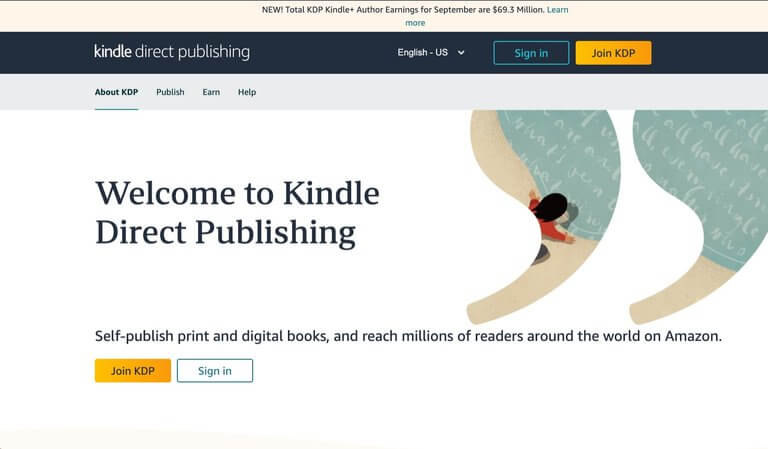
STEP ONE: Log in to your KDP account at kdp.amazon.com.
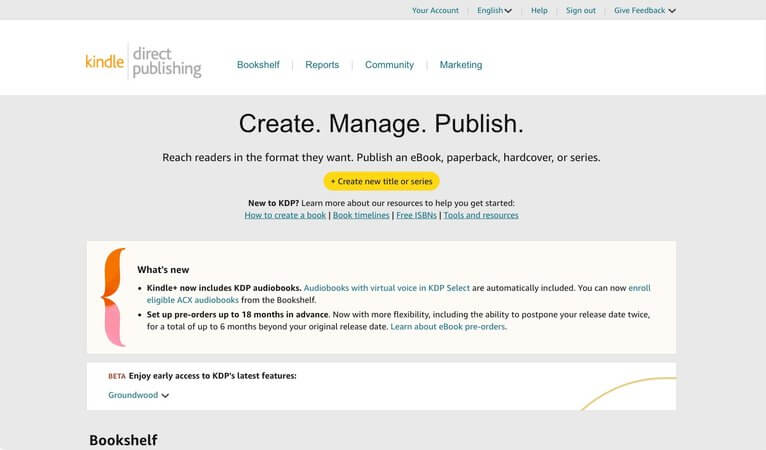
STEP TWO: Navigate to your Bookshelf page.
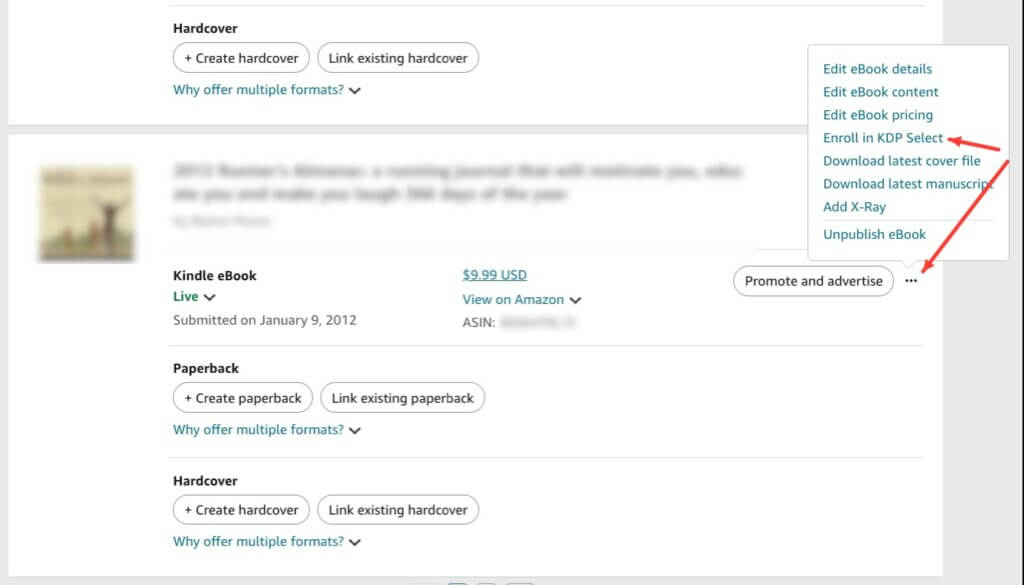
STEP THREE: Scroll to the book you want to enroll in KDP Select, click on the “…” button, and choose “Enroll in KDP Select”.
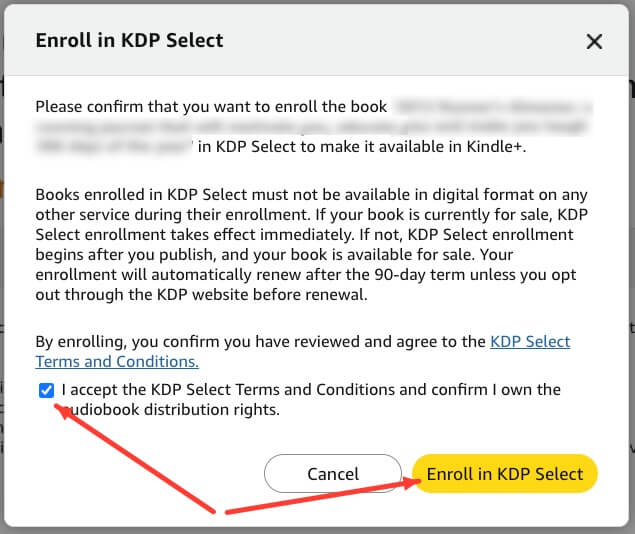
STEP FOUR: Read the dialog box that pops up. Check the box to accept the terms and then click on the “Enroll in KDP Select” button at the bottom.
You are now enrolled. The screen that comes up next gives you access to various promotion options available only to KDP Select books. Give them a skim while you’re there, but for now you’re done.
NOTE: You can also enroll a new book in KDP Select as part of the process. Just select the check box as you’re going through and it will be in the program from the beginning.
If you want to remove your book from KDP Select:
Although KDP Select can be a solid program, you may want to cycle books out of the program so you can sell them at other venues. When you want to do that, take the following steps.
- Go to your Bookshelf, click the “…” button next to the ebook, and choose Manage KDP Select.
- Choose Turn off automatic renewal. (If the book has an ACX audiobook enrolled, you’ll see Renew eBook only or Turn off automatic renewal for all formats.)
- Then click “Save changes.”
If your book is still within the first three days of a term, you can cancel instead from the Marketing page under Cancel enrollment.
Your book stays enrolled until the end of the current 90-day term. If you have a Virtual Voice audiobook, it will be removed from Kindle+ and Audible Plus at the same time.
Kindle+ Enrollment
Kindle+ (formerly Kindle Unlimited or KU) is a service Amazon offers readers where they can read as many books as they want for just $11.99 per month in the US. Publishers get paid from a shared fund Amazon accumulates from the monthly fees. Your share is based on how many pages Kindle+ subscribers read, measured in Kindle Edition Normalized Pages (KENP), and you’re paid for each page only the first time a subscriber reads it.
You also get paid normally for any sales you make outside of Kindle+.
Ways to leverage Kindle+
- Share to your newsletter and social media the book’s status, encouraging fans and subscribers who have Kindle+ to read your book for free.
- Organize a “read in” with Kindle+ subscribers where a lot of people open and read the book on the same day, maximizing its performance in book ranking. (Warning: You cannot offer any incentives for people to read your book in Kindle+; asking them to read it is fine, but offering them a discount on future books or bonus content is not.)
- Ask fans with a Kindle+ subscription to read and review your book.
- Put Volume 1 of a series on Kindle+ to attract readers to your paid titles.
Audiobooks in Kindle+
As of October 2026, you can now get (some of) your audiobooks into the Kindle+ catalog! There are two methods, both of which require your ebook to be in KDP Select:
- Create a Virtual Voice audiobook inside your KDP Dashboard, which will add your audiobook to both Kindle+ and to Audible Plus. (Do note, however, that your Virtual Voice audiobook must be the exclusive audiobook version of your book available on any market until it’s removed from Kindle+.)
- Enroll your Pay for Production ACX audiobook in KDP Select from your KDP Bookshelf. It must be exclusive to Audible and have Read & Listen (Whispersync for Voice) enabled.
Readers will be able to read or listen to your book, and you’ll be paid based on how many pages are read no matter which method they use. However, there’s no double-dipping; you’ll only be paid once for either page reads or listens, but readers can mix-and-match.
Audiobooks are only available to readers in the US at the moment, though we expect that will expand in the near future.
Additional KDP Select Perks
There are a few additional perks you get for enrolling your book in KDP Select. There are promotional opportunities directly with your book (you can choose either free days or a countdown deal for each 90-day term), or through wider promotions in the Amazon marketplace.
Note that these perks only apply to ebooks in KDP Select, not to audiobooks.
Free Download Promotion
Under normal circumstances, Amazon will not allow you to price your books below 99 cents. However, any book in KDP Select can be discounted to free for 5 days per 90-day enrollment. You can do all five days at once, or spread them out across the period.
Amazon maintains separate bestseller books for the free giveaways, which gives your book better visibility than it might have in the larger lists of all Amazon titles. Besides this, free books get the attention of readers.
Ways to Leverage the Free Download Promotion
Most of the techniques to leverage your Kindle+ enrollment also apply here. After all, marketing free books is the same regardless of how people get them for free. Remember you’ll be making the copies available to a wider group of readers so cast a wide net as you announce the book you’re putting up for free.
For an advanced trick, use a single day out of your five for A/B testing cover designs or similar elements of your promotion, to get it in front of more faces and see which performs better.
Kindle Countdown Deal
A Kindle Countdown Deal lasts anywhere between 1 hour and 7 days and is only eligible for books on Amazon.com or Amazon.co.uk. For that period, your book will be available at a discount with a clock counting down to when the price returns to normal. You can also set up tiered pricing, so the book can start at $.99, then go up to $1.99, then to $2.99, until you reach your original price.
These deals promote scarcity, adding time pressure to people who are considering buying your books. They also have the benefit of giving you that 70% royalty even while your book is temporarily priced below $2.99.
To run a countdown deal, your book must be priced between $2.99 and $24.99 in the US or £1.99 and £15.99 in the UK, and your book must have been enrolled in KDP Select for at least 30 days first.
Ways to Leverage a Countdown Deal
- Track purchases at the different price points to make certain you’ve priced your books at the best possible point
- Announce early that your countdown deal will begin, then post regular updates about its status
- Put one of your books on deep discount, then discount other books in a series at a slightly lower discount for the same period.
Nominate for Promotions
From the Marketing page of your KDP dashboard, under Nominate for promotions, you can put your ebooks forward for two of Amazon’s own promotions:
- Prime Reading gives Amazon Prime members a rotating selection of books to read at no extra cost. It’s only open to books enrolled in KDP Select, and you can nominate one book at a time. Selected books generally stay in Prime Reading for 90 to 180 days and remain available for sale the whole time.
- Kindle Deals are limited-time discounts that can run from a single day to several weeks. Your ebook doesn’t need to be in KDP Select, but it does need to be on the 70% royalty option. You can nominate two books at a time, and Amazon recommends books that have been out for at least 90 days and are priced between $2.99 and $12.99.
Each nomination lasts 90 days and can’t be edited or cancelled once you submit it. A nomination doesn’t guarantee a spot: if Amazon picks your book, they’ll email you the details, and you can accept or decline.
Higher Royalty Rates in Some Markets
In Brazil, Japan, India, and Mexico, the normal royalty rate is 35% for all ebook sales, no matter the price. However, if you are enrolled in KDP Select, then you have the option to choose a 70% royalty rate like you can in other markets as long as your book meets the requirements.
KDP Select Conclusion
At Apex Authors we think that there are great opportunities for using KDP Select. Depending on your circumstances, you need to decide whether it’s right for your book or series…but you can choose a different strategy for each book!
Ask yourself:
- Is my genre big in Kindle+?
- Do I sell ebooks direct (or do I want to)?
- Where do I sell my audiobooks?
- Is this one book or an entire series?
- Am I willing to put a reminder on my calendar every 90 days to check my status?
If you want to know more about how to answer those questions or different strategies you can use with your books and KDP Select, as well as answers to questions about all of the details we’ve mentioned above, be sure to check out Training #659 — KDP Select in the Kindle+ Era.