
4 Ways to Access Claude Code for Your Author Website (And What They Actually Cost)
In this week’s live training and the one coming up next week, Erin and I are using Claude Pro (Anthropic’s $20/month subscription) to build author brand guidelines and a full author website from scratch. It’s the simplest on-ramp: sign up, download Claude Desktop, and you’re building.
But here’s the thing I told everyone on the training and want to make sure doesn’t get lost: you don’t need a Pro subscription. Especially after that first month, when your site is built and you’re mostly making small tweaks like a new book cover here or an updated bio there.
There are cheaper (and even free) ways to keep working with Claude Code (or something so similar it might as well be the same app…)
I tested four different methods, and here’s what I found.
Which Method Is Right for You?
Here’s a quick comparison to help you decide. All four methods can build a full author website and run our branding and website skills. The difference is cost, ease of setup, and which interface you’ll be using.
| Method 1: Claude Pro | Method 2: Claude API Keys | Method 3: Deepseek | Method 4: OpenCode | |
| Cost to build a site | $20 (one month) | ~$8.50 | ~$0.80 | $0 |
| Recurring cost | $20/mo | Pay-as-you-go | Pay-as-you-go | None |
| Interface | Claude Desktop | Claude Desktop | Claude Desktop | OpenCode |
| Setup difficulty | 🟢 Easy | 🟢 Easy | 🟠 Tricky | 🔴 Technical |
| Best for | First month, heavy lifting | Long-term occasional use | Budget, same interface | 100% free |
🟢 Method 1: Claude Pro Subscription + Claude Desktop — The Easy Button
$20/month. Download Claude Desktop, log in with your subscription, and you’re off. This is what we use in the demos. Use Opus (the top model) for making brand decisions, Sonnet for doing the work of building files. The only real downside is that $20/month is recurring. Great for your first month when you’re doing the heavy lifting, or if you already have a subscription for other reasons anyway. It’s overkill once your site is built and you’re just making small updates here and there, though.
Claude Pro also has usage limits. If you’re running Opus with high reasoning for hours, you might hit a cooldown. Switching to Sonnet for the execution-heavy phases helps. Session limits start when you ask a question and last for the next 5 hours, and then your next response after that will begin a new 5-hour session. There’s also a 7-day rolling window for your weekly usage limit.
🟢 Method 2: Claude API Keys + Claude Desktop — Pay Only for What You Use
Almost as easy as Method 1. Instead of a subscription, you load $10 in API credits (which can be used at any time for up to a full year) and tell Claude Desktop to use those instead. Our test website cost a little under $8.50 to build with Sonnet. The remaining credits sit in your account for future tweaks. Same Claude Desktop interface, same skills, nearly identical workflow; you just click a couple extra times to tell Claude Desktop to use API keys and it will actually create one and set it up for you without you having to do a thing.
This is what I recommend for most authors after month one. Unless you already have a Claude subscription for another reason, of course. There are two main downsides to this method that I should tell you about.
First, your spending isn’t capped by your subscription and usage limits, so while you’ll probably spend less than in a subscription, you could spend more. If you are only using this method for small future updates to your site as you need them, then that won’t be a problem.
The second downside is that the API keys don’t currently have access to Claude Design; you need a subscription for that. That’s outside of the scope of our Claude Code demos, but I thought it was worth mentioning.
🟠 Method 3: Deepseek API Keys + Claude Desktop — Same Interface, Cheaper Engine
You keep Claude Desktop as your interface, but route the actual work through Deepseek v4 Pro instead of Anthropic’s models. Our test website cost less than $0.80. And honestly? The output was better than Sonnet in a few spots. Setup is a bit more involved than Method 2 (you’re configuring a custom API endpoint), but once it’s done, the day-to-day experience is the same.
There are two trade-offs: Deepseek is great for code generation, but I’d still recommend Opus (via Method 1 or 2) for the branding decision-making phase. Deepseek shines in the execution phase, which is most of the website build anyway, and will probably perform better than Sonnet and close to Opus.
The second trade-off is that unless you are setting Deepseek up on your own server (which is outside the scope of what we’re teaching here) and are just using their public APIs, then your requests are going to be routed through China. For a simple author website, that’s not a big deal. But do be aware that anything you use through their interface could potentially be analyzed by the Chinese government.
🔴 Method 4: OpenCode — 100% Free
OpenCode is an open source application similar to Claude Code and has a separate desktop application (similar to Claude Desktop) that gives you a mostly familiar interface. OpenCode offers access to basically any code model you want, including completely free ones. You could do everything we teach without spending a dime. The interface isn’t quite as polished as Claude Desktop, and there are a few workflow differences to get used to, but if your budget is zero, this works.
Free models are slower and less capable on complex reasoning, but for website building (which is more execution than decision-making), they get the job done. You can also use paid models through OpenCode if you ever want to upgrade.
OpenCode does not have the same artifacts window as Claude Desktop, though, so any time that it wants to preview a page for you, it’s going to open a new browser window rather than showing it to you right next to your chat window. You’ll also have to manually add the skills into your project, though you can ask the AI agent to do it for you.
My Honest Recommendation
- Start with Method 1 (Claude Pro) for your first month. $20 for a full brand kit and a complete author website is absurdly good value.
- Switch to Method 2 (API keys) for month two and beyond. Put $10 in credits and use them for tweaks over the next year.
- Try Method 3 (Deepseek) if you’re comfortable with a little extra setup and want to keep ongoing costs under a dollar.
- Go with Method 4 (OpenCode) if you want to pay nothing at all and don’t mind a slightly different tool.
You can also mix and match. Use Claude Pro for the branding session where Opus shines, then switch to Deepseek for building the website where a cheaper model excels.
Setup Instructions (Choose Your Method)
Pick your method below. The setup steps are different for each, but once you’re configured, the experience of running our skills is the same across all four.
🟢 Method 1: Claude Pro + Claude Desktop
What you need: A Claude Pro subscription ($20/month), Claude Desktop (free download).
- Subscribe to a Claude Pro subscription at claude.ai. (Note that it defaults to an annual plan, and not the monthly plan.)
- Download and install Claude Desktop for Mac or Windows.
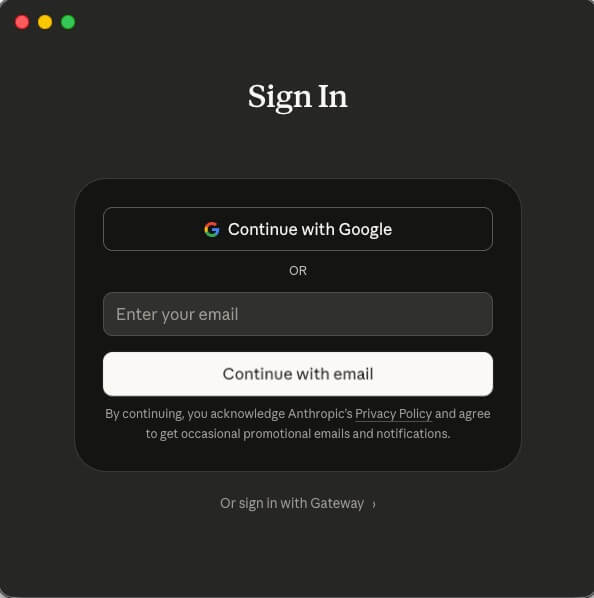
- Open Claude Desktop and log in with your Claude account. You may need to enter a verification code sent to your email address, or click on a magic sign-on link.
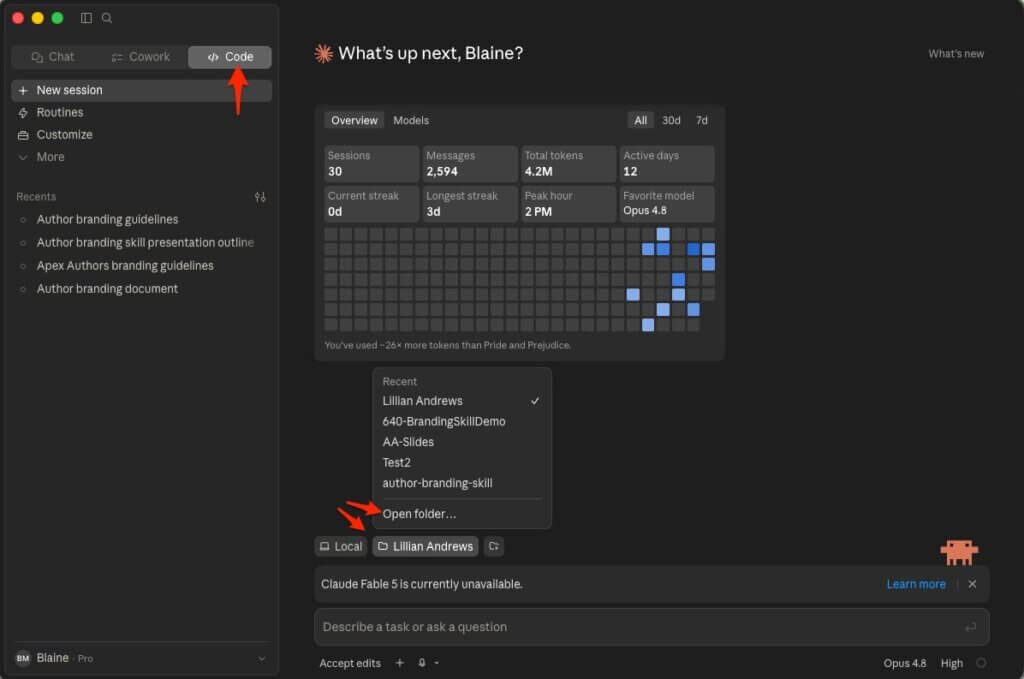
- Click into the Code tab. (Cowork should also work, though I use Code.)
- Choose a project folder: click the folder icon at the bottom, select Open Folder, and pick (or create) a dedicated folder for your author site project. I recommend not giving Claude access to your entire hard drive: just a single project folder.
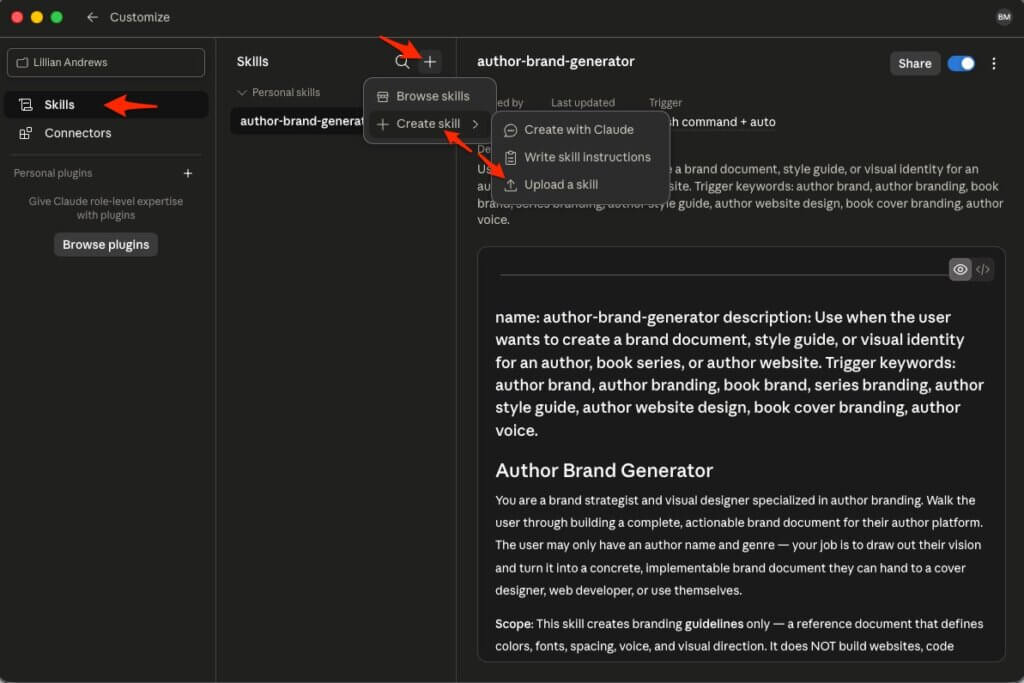
- Download our skill(s) from the replay page(s). They’ll be a
.md(markdown) or.skillfile. - In Claude Desktop, click Customize → Skills → + → Create Skill. Upload the skill file.
- Start a new session and type:
Help me design author branding guidelines for my pen name.
or:Help me create an author website for my pen name.
That’s it. The skill takes over from there.
Model tips: Click the model selector in Claude Desktop. Use Opus (with high reasoning) when making brand decisions — it’s worth the wait. Switch to Sonnet for the execution-heavy phases of building files. This also helps you stay within Pro’s usage limits.
🟢 Method 2: Claude API Keys + Claude Desktop
What you need: An Anthropic API account, Claude Desktop (free), ~$10 in API credits.
- Go to Claude Console and create an account. Add a payment method.
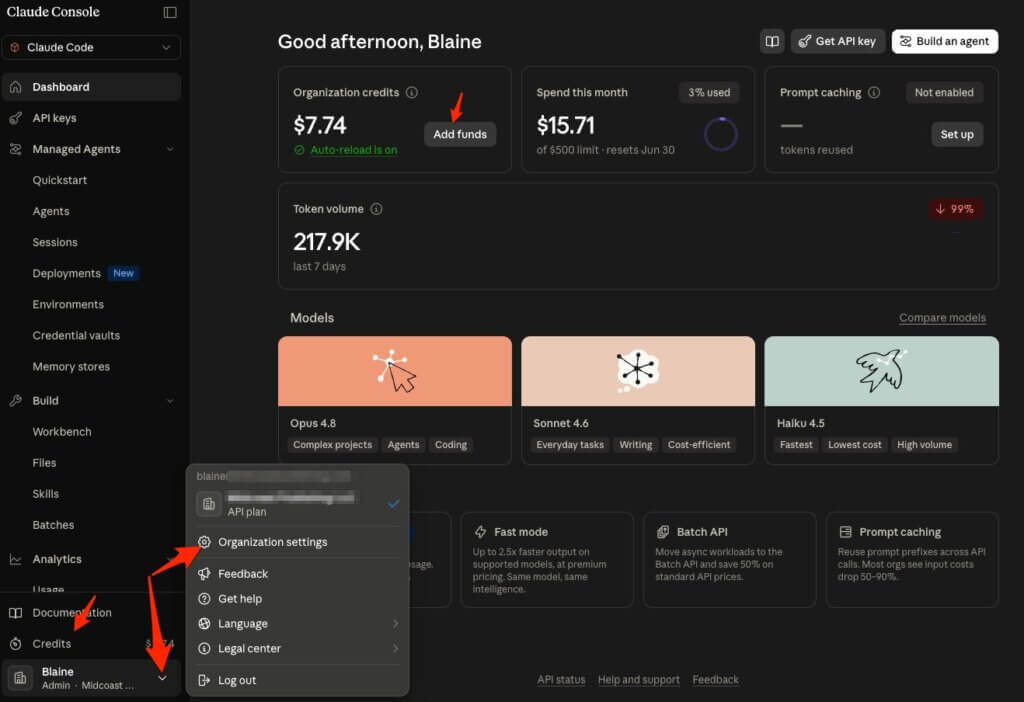
- Load credits. I recommend starting with $10 — that’s more than enough for building a site and making updates for months. You can find the billing page by clicking on the “Add Funds” button near the top of your dashboard when you login, by clicking “Credits” right above your name in the left navigation, or clicking your name and choosing “Organization Settings” and then “Billing”. (They make it easy to add funds to your account.)
- Download and install Claude Desktop for Mac or Windows.
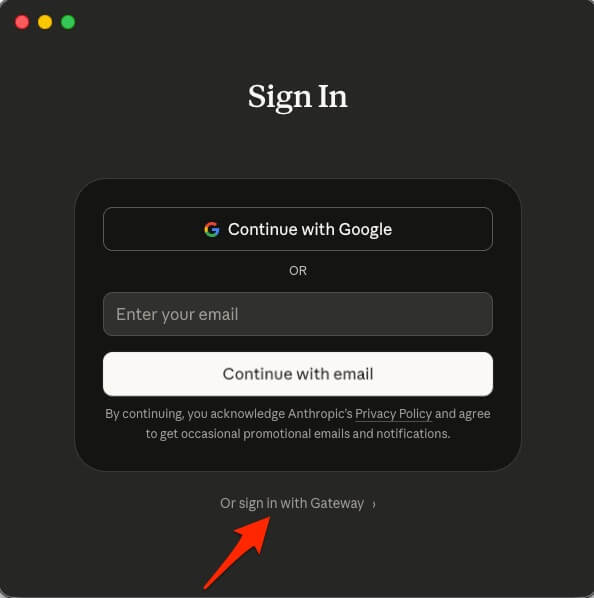
- Open Claude Desktop and instead of logging in, click the Or sign in with Gateway link.
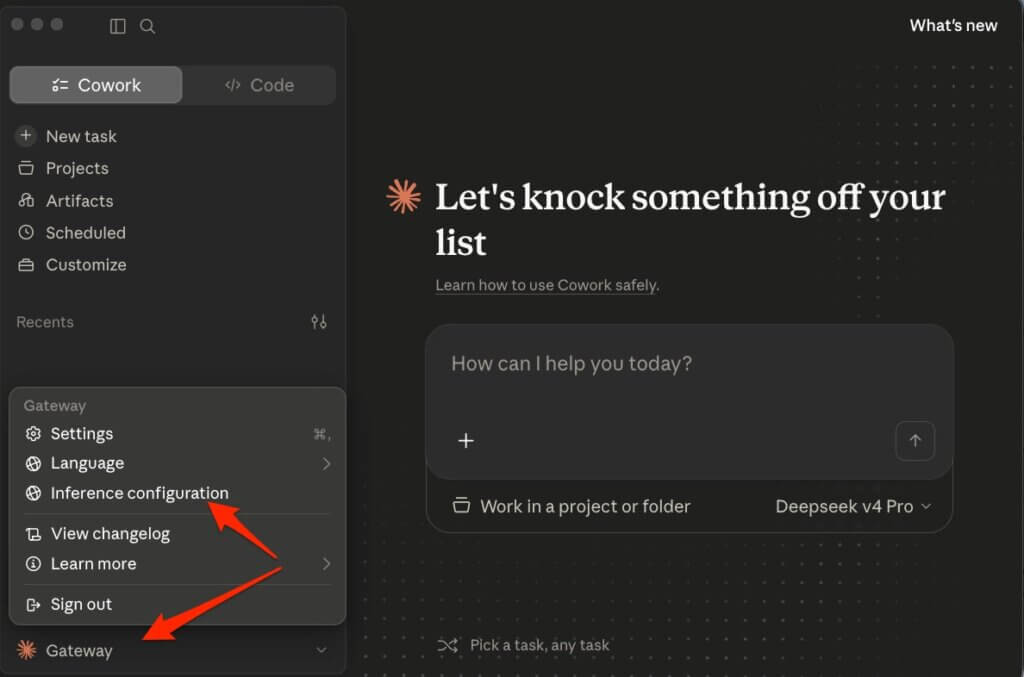
- You may go straight into the Configure third-party inference screen, but if not, click on Gateway → Inference configuration.
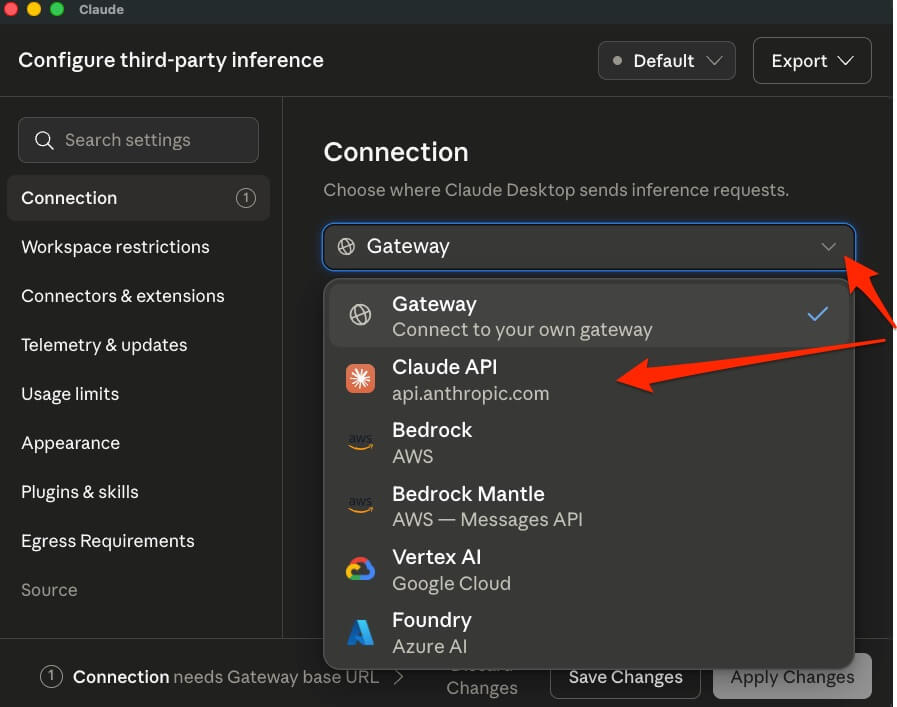
- You can update the default inference or create a new one by clicking on the Default dropdown at the top of the screen. (It’s possible to have multiple setups.) Then, open the Gateway dropdown and choose Claude API.
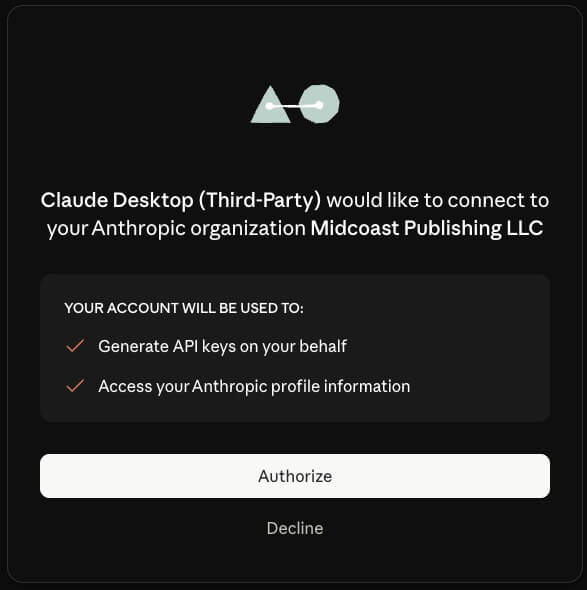
- You will be presented with an authorization screen. (You may need to login first.) Verify you are logged into the correct account (in small type at the very bottom of the screen) and then click Authorize.
- You are now connected and can test your connection and model discovery by pressing the appropriate buttons. When you are ready, press Apply Changes.
- Click into the Code tab. (Cowork should also work, though I use Code.)
- Choose a project folder: click the folder icon at the bottom, select Open Folder, and pick (or create) a dedicated folder for your author site project. I recommend not giving Claude access to your entire hard drive: just a single project folder.
- Download our skill(s) from the replay page(s). They’ll be a
.md(markdown) or.skillfile. - In Claude Desktop, click Customize → Skills → + → Create Skill. Upload the skill file.
- Start a new session and type:
Help me design author branding guidelines for my pen name.
or:Help me create an author website for my pen name.
What it cost us: Our test website build using Sonnet via API keys: a little under $8.50. Credits are good for up to a year.
Model tips: Click the model selector in Claude Desktop. Use Opus (with high reasoning) when making brand decisions — it’s worth the wait. Switch to Sonnet for the execution-heavy phases of building files.
If you want to be a little more budget conscious, stick with Sonnet for everything (or if it’s just a quick technical question, even consider switching to Haiku.) The difference is you’re paying per token instead of a flat monthly fee, so for small jobs you can save a lot of money over a monthly subscription and you aren’t penalized for not using it for a month or more, but you also have the potential to spend a lot more.
🟠 Method 3: DeepSeek API Keys + Claude Desktop
What you need: A Deepseek API account, Claude Desktop (free), a few dollars in Deepseek credits.
- Go to DeepSeek Platform and create an account. There’s a small Sign up link just above the Log in button. Add a payment method.
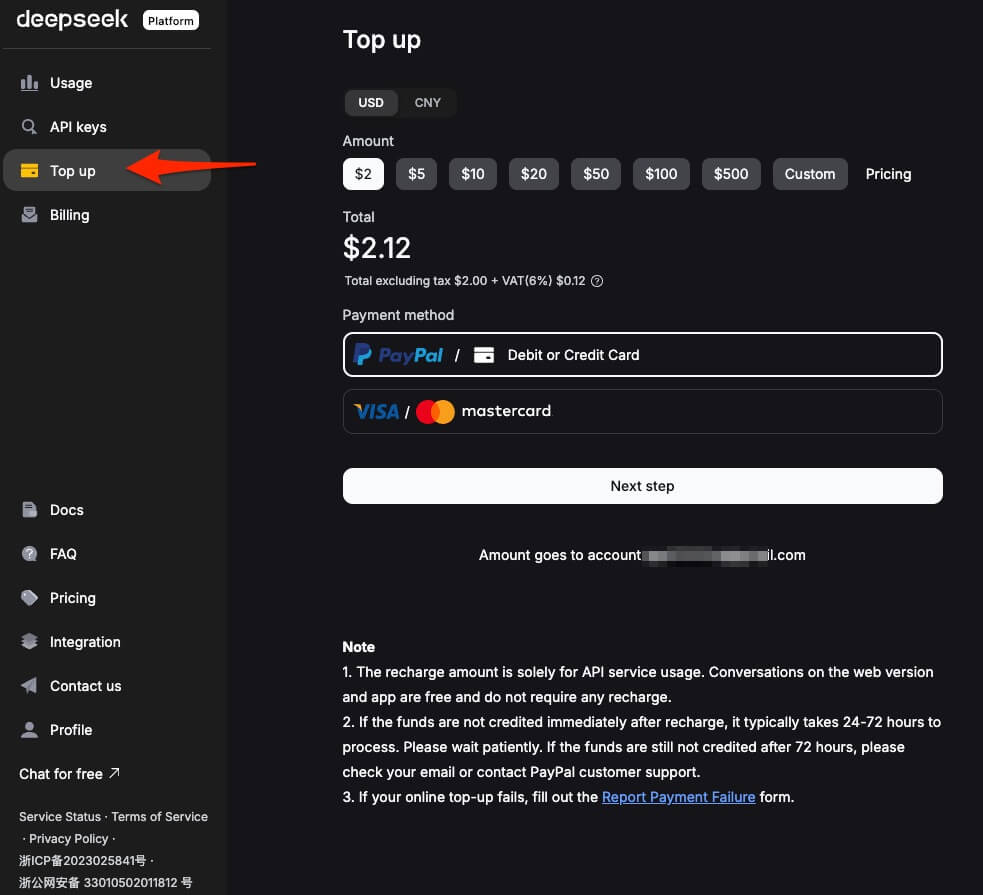
- Load Credits. I recommend starting with $2 or $5 — that’s more than enough for building a site and making updates for months. (As I write this, I am still on my original $5 from a year and a half ago, though I didn’t start using it until DeepSeek v4 Pro came out a month or two ago.) You can find the billing page by clicking on the “Top up” button in the left navigation.
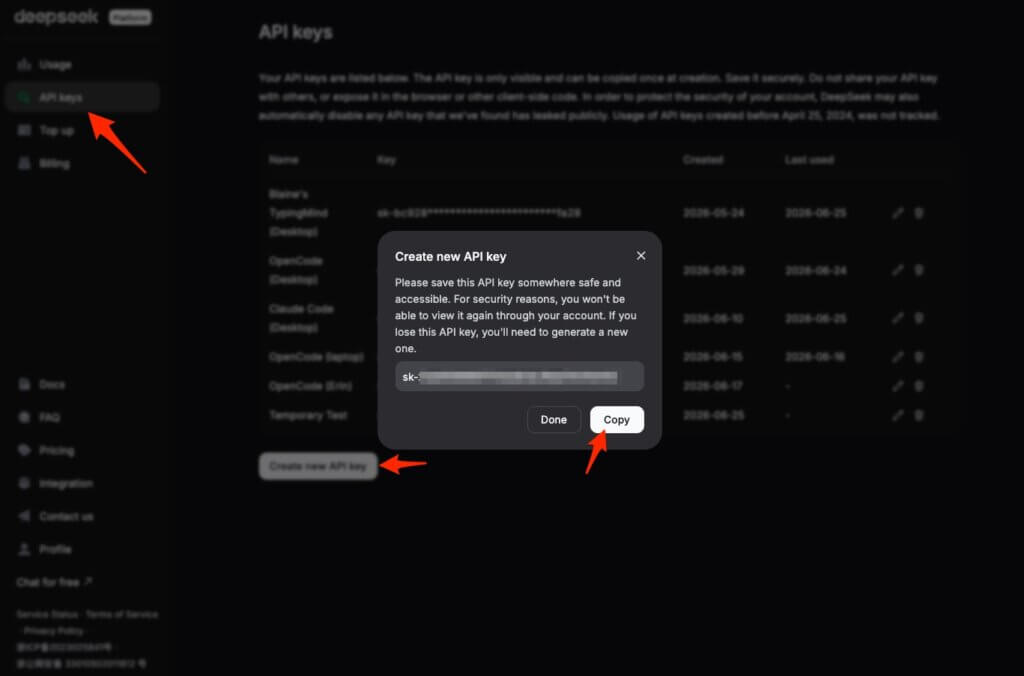
- Create a new API Key by clicking on API Keys → Create new API key → (giving it a name and continuing) → Copy. I recommend that you leave this screen up for the next few steps in case you need to copy that API key again; you will not be able to access it again in the future.
- Download and install Claude Desktop for Mac or Windows.
- Open Claude Desktop and instead of logging in, click the Or sign in with Gateway link.
- You may go straight into the Configure third-party inference screen, but if not, click on Gateway → Inference configuration.
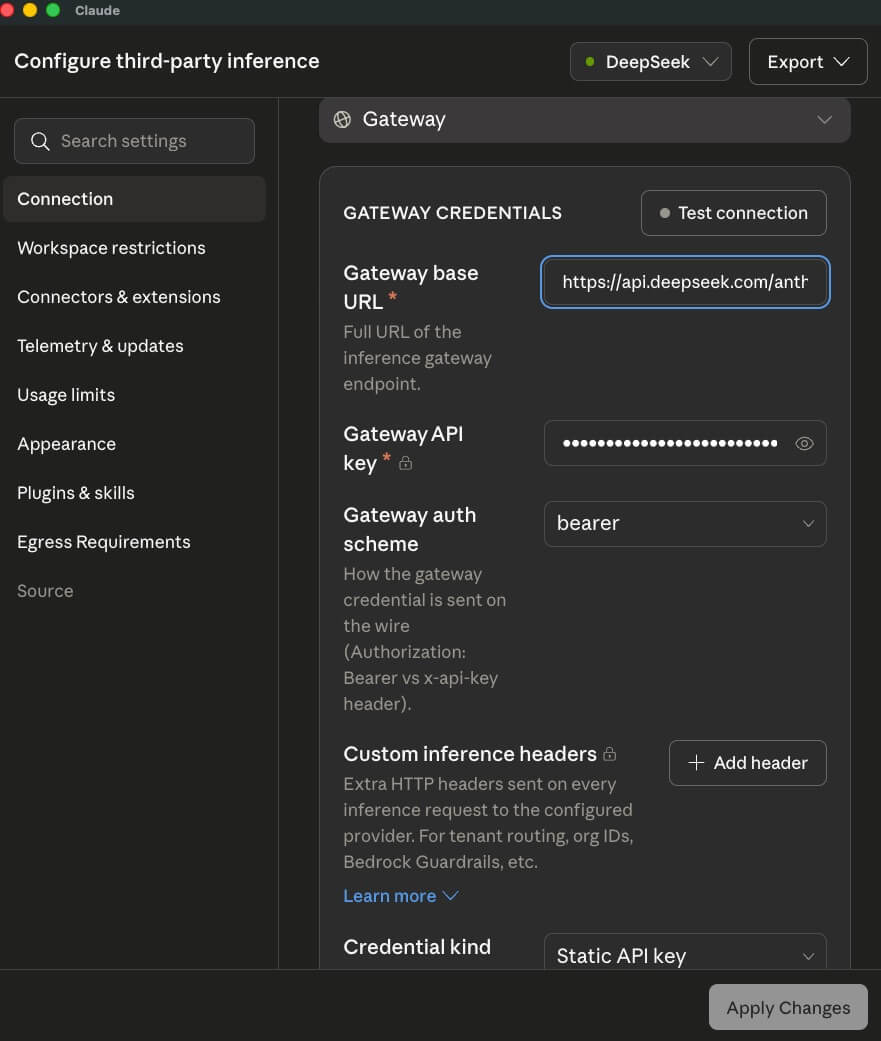
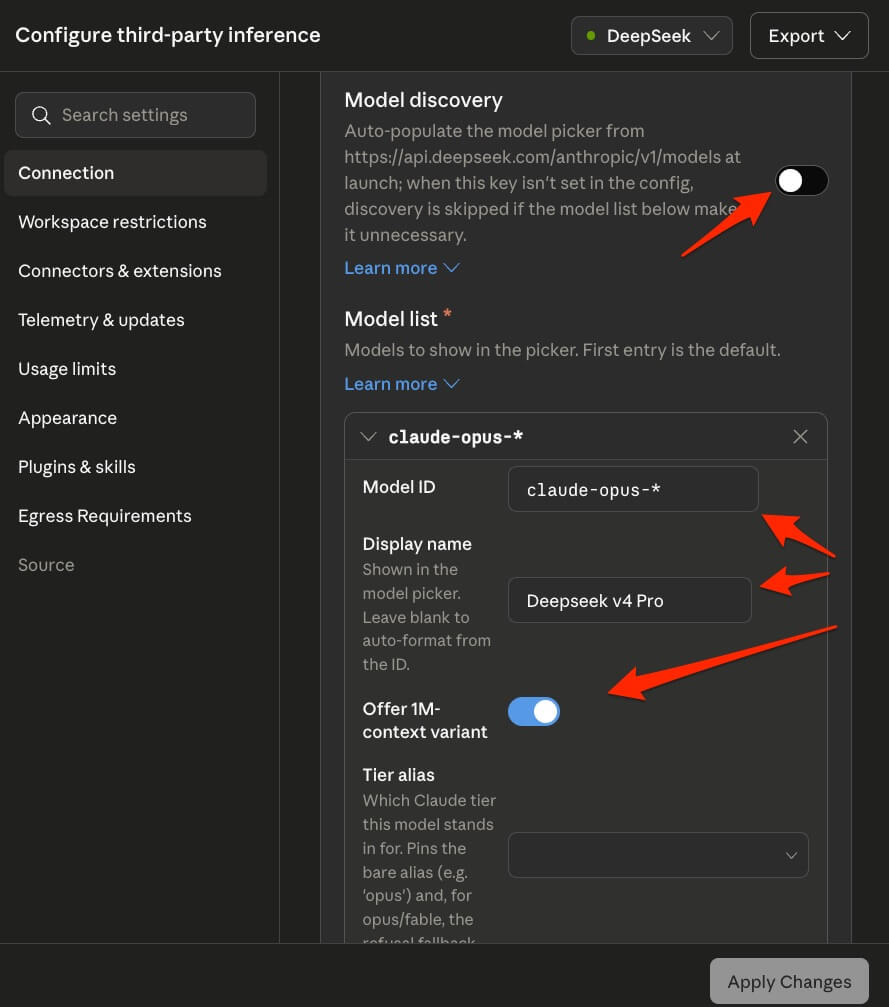
- You can update the default inference or create a new one by clicking on the Default dropdown at the top of the screen. (It’s possible to have multiple setups – you’ll note in the screenshot below I have created one specifically for DeepSeek.) Leave the Gateway dropdown on “Gateway (Connect to your own gateway)” and enter the following Gateway Credentials:
- Gateway base URL:
https://api.deepseek.com/anthropic - Gateway API key: (paste your copied API key from step 3)
- Gateway auth scheme:
bearer - Custom inference headers: (leave this blank – not needed)
- Credential kind:
Static API key
- Gateway base URL:
- You can not use Model discovery so click that off. You’ll have to manually create your model list by clicking on Add Item and then adding which models you want access to. DeepSeek recognizes and maps the Opus models to DeepSeek v4 Pro and the Sonnet and Haiku models to DeepSeek v4 Flash automatically. These are the settings that I use:
- Model 1:
- Model ID:
claude-opus-* - Display Name:
DeepSeek v4 Pro - Offer 1M-context variant: (turn this on)
- Tier alias: (this was not available when I set it up; you may want to choose Opus.)
- Model ID:
- Model 2:
- Model ID:
claude-sonnet-* - Display Name:
DeepSeek v4 Flash - Offer 1M-context variant: (turn this on)
- Tier alias: (this was not available when I set it up; you may want to choose Opus.)
- Model ID:
- Model 1:
- You are now connected and can test your connection and model discovery by pressing the appropriate buttons. When you are ready, press Apply Changes.
- Click into the Code tab. (Cowork should also work, though I use Code.)
- Choose a project folder: click the folder icon at the bottom, select Open Folder, and pick (or create) a dedicated folder for your author site project. I recommend not giving Claude access to your entire hard drive: just a single project folder.
- Download our skill(s) from the replay page(s). They’ll be a
.md(markdown) or.skillfile. - In Claude Desktop, click Customize → Skills → + → Create Skill. Upload the skill file.
- Start a new session and type:
Help me design author branding guidelines for my pen name.
or:Help me create an author website for my pen name.
What it cost us: Our test website build using DeepSeek v4 Pro via API keys: about $0.80. I have not noticed that credits expire as of the time I am writing this (my current credits were bout almost 18 months ago.)
Model tips: Click the model selector in Claude Desktop. Use DeepSeek v4 Pro (or whatever you called it in step 7) for everything, and change the reasoning level based on your tasks. Higher reasoning when making brand decisions, or lower reasoning when doing simple executions. If you are looking for speed, then switch to Deepseek v4 Flash.
Flash is about ⅓ of the price of Pro, but Claude Opus is 57x more expensive than DeepSeek Pro, and Sonnet is about 34x more expensive, so I generally stick with DeepSeek Pro unless I need speed or am working on something that Flash is specifically geared to be better for.
🔴 Method 4: OpenCode + Any API Keys
What you need: OpenCode Desktop (free download), API Keys to your preferred service (free or a couple of dollars)
OpenCode has a different setup process, as it doesn’t use the same app as the other three options. It provides a similar interface as Claude Code inside of Claude Desktop, but installing skills works a little differently and there’s no artifact window so any previews or showcases will open in a browser window instead of right in the app. The software is open source, so you do not need to pay anything if you don’t want to. It also works on Linux as well as on Mac and PC. You can integrate OpenCode with over 75 different providers (so almost any AI model that you want.)
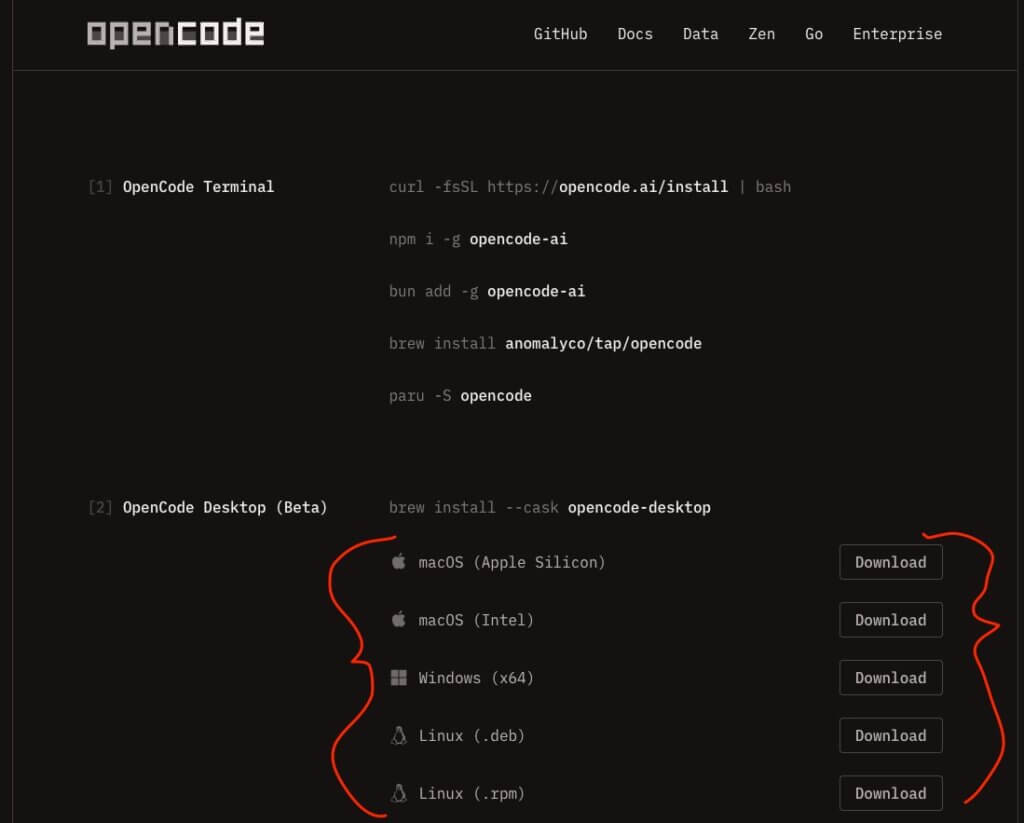
- Download and install OpenCode Desktop (option [2] on the download page; choose an installer for your operating system.)
- Open the Settings by pressing the gear icon in the lower left corner (⚙️) and choose Providers. This is where you choose what company you are going to connect to that will provide the AI models that you will use.
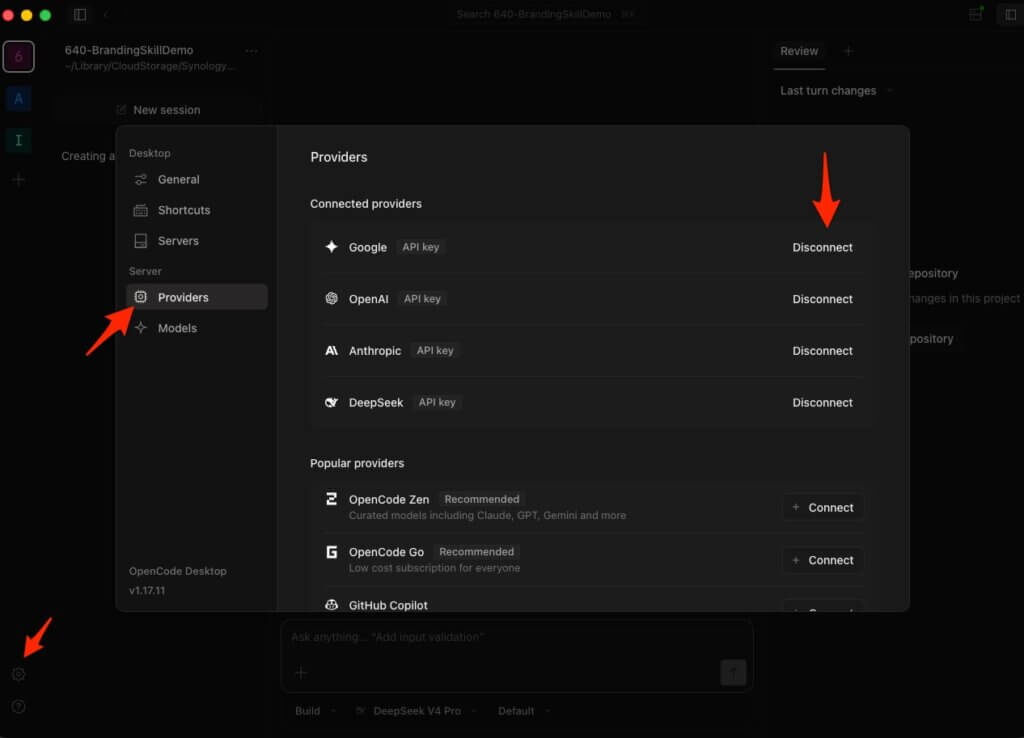
- Choose which provider(s) you want to use, and setup API keys for them and choose the Connect button for each one you want available. Here are some options you may want to consider:
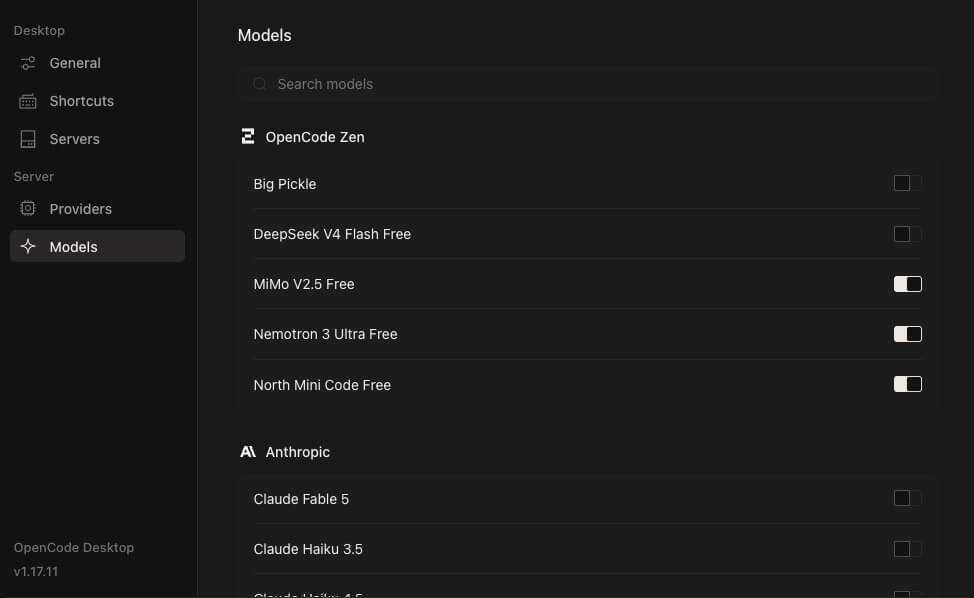
- OpenCode Zen: A curated list of over 50 models provided directly from OpenCode using as pay-as-you-go model. The advantage of using them is that they curate a list of models that are configured to specifically work well with OpenCode agents. You can purchase token credits from OpenCode Zen, which they use at-cost for the models they offer and only charge you their credit card processing fees on top of the credits you are purchasing. Using OpenCode Zen also gets around geographic restrictions for companies that are not available in your locale. They currently offer 5 models completely for free (though your conversations will be used for research and for improving their models):
- Big Pickle
- DeepSeek v4 Flash Free
- MiMo-v2.5 Free
- North Mini Code Free
- Nemotron 3 Ultra Free
- OpenRouter: Access to over 300 models (including over 20 that are free) using a pay-as-you-go model, though you may run into rate limits if you do not provide any billing information. They charge a 5.5% fee when purchasing credits and then pass token costs along directly to each model.
- Direct access to individual providers: You can use your own API keys for all of the major providers such as OpenAI (ChatGPT), Anthropic (Claude), Google (Gemini), DeepSeek, and NVIDIA (Nemotron). You can also use your subscriptions through ChatGPT Plus and GitHub Copilot or Duo out of the box, however you would need a 3rd party plugin to use your Claude Pro or Max subscription which is against Anthropic’s terms of service.
- Local models: You can also use local models such as Ollama or DeepSeek, but performance is going to be dependent upon your hardware and is beyond the scope of this tutorial.
- OpenCode Zen: A curated list of over 50 models provided directly from OpenCode using as pay-as-you-go model. The advantage of using them is that they curate a list of models that are configured to specifically work well with OpenCode agents. You can purchase token credits from OpenCode Zen, which they use at-cost for the models they offer and only charge you their credit card processing fees on top of the credits you are purchasing. Using OpenCode Zen also gets around geographic restrictions for companies that are not available in your locale. They currently offer 5 models completely for free (though your conversations will be used for research and for improving their models):
- Once you have setup your providers, click the Models link in the left Settings navigation and then toggle the models that you do or don’t want available on or off for each provider.
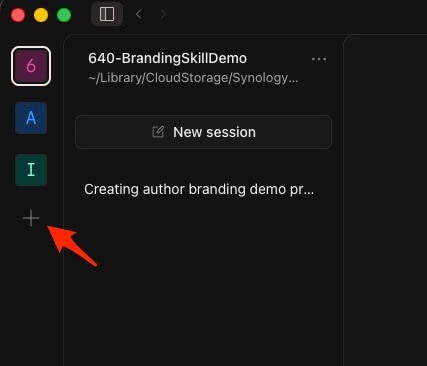
- Choose a project folder: click the + icon below your list of projects in the left navigation and then pick (or create) a dedicated folder for your author site project. I recommend not giving OpenCode access to your entire hard drive: just a single project folder.
- Download our skill(s) from the replay page(s). They’ll be a
.md(markdown) or.skillfile. - There are a few ways that you can install skills in OpenCode; it searches both global and project folders for both internal OpenCode skill directories or for Claude Code skill directories. Rather than explain where to put those files and how to install them, I’ve provided a simple prompt that you can copy and paste into a session after downloading the skills into your project folder that will install them into your local project. If you would prefer to make these skills global or learn how to do it yourself, check the Agent Skills help doc at OpenCode.
- To install the Author Branding skill, download it to your project folder and copy and paste this prompt into OpenCode:
- To install the Author Website Generator skill, download it to your project folder and copy and paste this prompt into OpenCode:
- Start a new session and type:
Help me design author branding guidelines for my pen name.
or:Help me create an author website for my pen name.
Once You’re Set Up
No matter which method you chose, the next steps are the same:
- Training #640 Replay: Easy Author Brand & Design Guidelines with Claude Code — Download the skill and build your brand rulebook.
- Training #641: Easy Author Websites with Claude Code — Tuesday, June 30th at 1:00 PM Eastern — We’ll take your brand document and turn it into a live website, hosted for free.