Click anywhere within this unedited transcript to jump directly to that part of the training.
Welcome & Meet Spoken Press (AI Audiobooks for Authors)
Blaine Moore: Hello everybody. Welcome to another Apex Authors live training. And Erin and I have a special guest today from Spoken Press. Joshua is one of the original people almost. We were chatting a little before we got started. He was only a couple months after Spoken was founded, and has been there right from the beginning with the beta versions and for the early public releases.
I got to meet the Spoken team last November at Author Nation. A friend of ours, Jessie Kwak, has been working with them and introduced me to the Spoken team and Spoken, took us out to a fun night of karaoke where I got to do my horrible singing and, enjoy everybody else’s performances. And so what they do is they have a system where you can go in and create an audio book with whether that be one narrator or dual narration, or having a separate voice for every single one of your characters.
And it can manage that whole process for you. And it’s kind of neat the way that it works. It’s a way of making it a lot easier to create your book. If you remember when we first experiment with ElevenLabs, they had the… You know, it was just a long process and I was only using a, a single narration voice, and they’ve streamlined that process to make it easier for the editing of your audiobook.
So, Joshua, thank you for joining us and let’s see how the system works and how we can take advantage of it.
Joshua David Pivato: Yeah, thank you so much for having me here. And you’re very right that the studio was built to streamline the whole creative process as it pertains to AI, digital narration and keeping the authors workflow in mind.
So our team is a team of authors and we’ve built the studio with, with with that process at the heart and the core of the, the entire workflow. So Spoken is an agentic studio to create your audiobook, turning any manuscript. PDF doc or now epub supported into an audiobook. And that audiobook can be in either single narrator, duet, narration, or full cast, what we call multi voice.
So I’m gonna share my screen here and without further ado, bring you right into the studio.
Blaine: Great!
Joshua: All right. Everyone can see my screen here?
Blaine: Yep. That is showing up for us.
Spoken Studio Overview: Projects, Tabs, and Uploading Your Manuscript
Joshua: Perfect. Perfect. So this is Spoken Studio and Spoken Studio you can navigate to once you create an account on Spoken at Spoken Press.
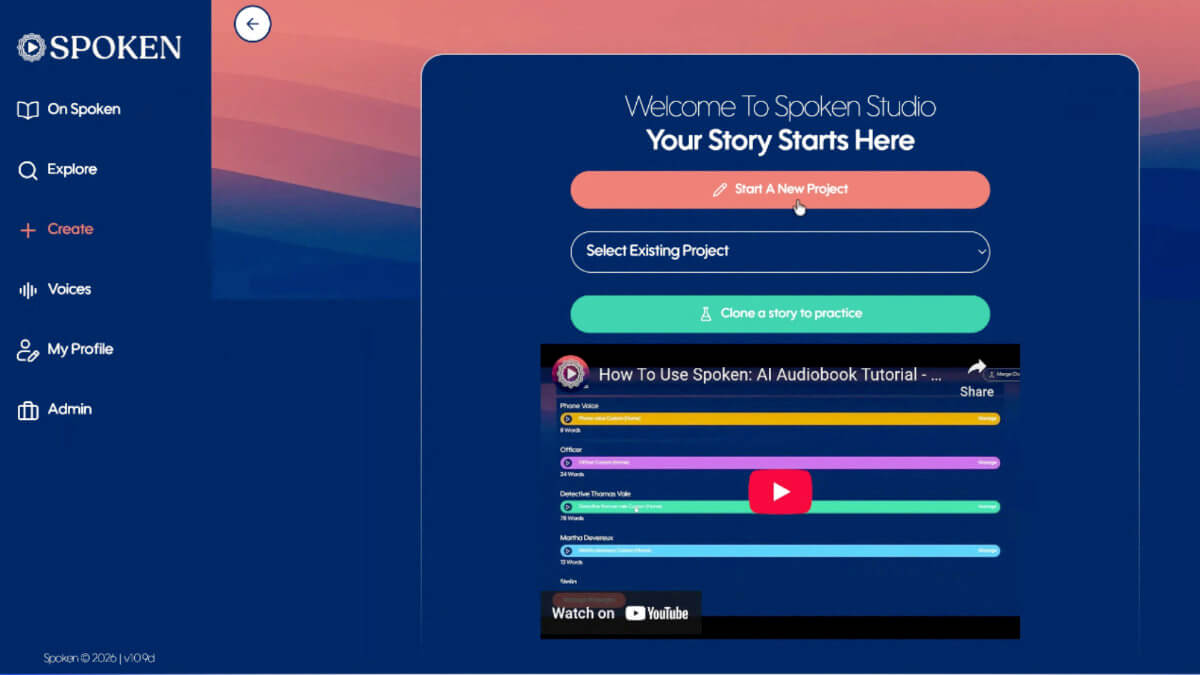
Once you’ve created an account, you’ll see right here on the navigation menu the ability to create. The studio itself is very simple and it all begins with starting a new project. A new user at any time can decide to clone a story. Instead, what that does, it brings a sample story into the studio for you to see the bells and whistles and get a feel for it before you decide to bring in your own project.
Before we throw you right into the studio, there’s always this YouTube link right here to our tutorial. It’s a quick six minute long tutorial that again shows you everything you need to know if you ever forget it, or it’s your first time here.
So starting a new project brings you right into Spoken Studio, and you’ll notice here at the top four tabs, these four tabs are the sequential workflow tabs.
It all begins with “Project Manager”, then “Voices”, “Passages”, and “Publish”. So we’ll go through each one, but you can navigate these four tabs at any point in the process. And that’s really how simple it is. Just those four steps you begin with putting in your project title, and here you have three options. You can upload your PDF Doc or epub, like I mentioned, or you can manually add your text directly into the studio.
And as well, we support MP3 files. If you’re building an audio book that perhaps requires a musical overture or an interlude between chapters or you’ve recorded your own personal author commentary. And so you might not be able to see my expanded window here, but I’m simply navigating to a PDF doc and uploading it here.
Once it’s uploaded, you’re gonna hit “Confabulate”. That’s the nice fancy word we’ve used to indicate the beginning process of Spoken Studio’s analysis.
Manuscript Analysis & Choosing Narration Type
Joshua: So on the analysis page, what we’re doing is we’ve ingested your manuscript. And we’re doing a deep analysis on all things related to your story. If it’s a multi chapter book, we’re going through each and every chapter and analyzing the characters, the speaking characters, the narration style, the genre category, language all the way to an Uber summary, which is drawn up from all of your chapters, or if it’s a short story in that case from the single installment.
And we give each and every one of these pieces of analysis to the author. As you can see here with the summary, channel tags, comparables and this other classification information.
All of the authors that use Spoken find these these pieces of information very valuable. And oftentimes we’ll take those and port them into their marketing materials wherever they’re distributing or on their personal storefronts.
So once that’s uploaded, this is where you’re gonna have the option to select your narration type. We have two narration types set out here, but they consist of a multitude of controls that you have as an author, as a creator. The first being single or dual narration.
Dual narration being where every chapter is flipping narrator; POV.
And secondarily, the multi voice or duet narration. Duet narration, in other words being alternating point of view, narration, where within any given chapter you can be flipping narrators from scene to scene.
So for the sake of this demonstration, and because it is Spoken’s specialty and something that we put a lot of emphasis in when building our studio and features, I’m gonna select multi voice, in other words, full cast narration where authors will be able to narrate not just a speaking character for every voice, but literally every single character in your book.
Meaning if there’s someone in the background who says hello at the World Fair, we’re going to create a voice for that character. And so you can have five speaking characters or a hundred speaking characters and with Spoken, that’s always gonna cost you the same. We’ll get more into the cost and pricing side of things after, but I just wanted to run you through the studio first.
Auto-Generating Character Voices & Hume vs ElevenLabs
Joshua: Here we have the ability to auto generate a custom voice for each narrator or character. So two options here. Three.
The first is “No Thanks”. That means when you draw up your voices, you are going to manually select and cast a character and a voice for every single person in your story. A lot of authors like to do this because they enjoy the granular control of going through our voice library, generating new voices to fit exactly what it is they envision the character to be.
They can also opt in for an easier route, a quicker route, which is to auto assign a character for every, or auto assign a voice rather, for every speaking character in their story. What happens there is that Spoken is going to derive a prompt from each character exactly based on how the author wrote the character, everything down to region, accent, gender, age, and other little nuances in their voice that might create a really interesting and unique character.
And with that prompt, create an original voice that will only ever exist for your project and for that character. So that’s pretty exciting. And it’s not a fixed thing. It’s also something that when that voice is cast, you can go in and change at any point. You have two options when doing that or, or even when you’re manually assigning two voice models to use when generating a voice.
The first being Hume AI and the second being ElevenLabs. You can mix the two as well. There’s a little bit of differences between these two ElevenLabs, which many of you may be familiar with and that you’ve all experienced and experimented with in the past.
ElevenLabs voices are multilingual. I believe at this point there’s over 70 speaking languages. They cover pretty much all of the most prominent global languages, and the ElevenLabs voices are proficient with mostly pronunciation I would say, and clarity.
Now, the Hume voices are; they excel with emotional dynamics. They’re extremely emotive voices. And the quality, the actual sample quality of the audio, in my opinion, is a little more studio grade.
It’s sort of a cleaner signal and just overall more polish. However, one of the things you’ll have to deal with is the pronunciations are a little hit and miss, so strengths and weaknesses to each of them. You can mix and match and you can see which you prefer. For the purposes of this demonstration we’ll opt in for Hume AI.
Once you’ve selected those things and you’re happy with the setup of your work, you hit make passages, and it’s at this point that we’re identifying the speakers and because we opted in for an auto assignment, we’ll be deriving those prompts for every character and creating those voices. I’d just like to hold there for a moment and if there’s any questions, it might be a good time to open the floor.
Q&A: Reusing Voices Across Series
Blaine: Yeah. One question that I had is you said that it’ll create a voice for you that’s only going to be used in this project. If you have sequels or other books that you want to do in the future, would you be able to reuse that voice for other projects as well and it would just be tied to your account?
Joshua: Yeah.
That’s a great question. And the answer is yes.
Once you’ve created that voice, it will append a name and custom voice for your character, and you can change that name. And it will be saved under your custom voices.
So once this process is complete, you’ll see in the Voice Library a toggle that says, “include my Custom Voices,” and you’ll see all the characters for your story, your anthology, and you’ll be able to go in there and cast them for each and every volume or every chapter. However you wish to use them.
Q&A: Regional Accents
Blaine: And Alexander’s wondering if you are able to do regional accents. So for example, having a UK or an Australian voice instead of just a straight American voice.
Joshua: Yes, absolutely. Absolutely. And the more the models are being trained they’re getting a little more specific in terms of dialect and region.
And so in the beginning, you know, go back a year there was standard British, but now they’ve gotten a little more detailed and you know, you can start to prompt things such as like you mentioned the UK Scottish or an Irish accent. And they’re becoming more proficient at that as well. There are voice actors, so our library, a point of note here is that our library, outside of the voices you generate, have over a hundred voice actor voice clones.
And those are all voice actors that get paid for the use of their voice. And many of those voice actors are from various regions in the UK or various states and regions in the United States or all over the world for that matter. And that’s where you can start to get specific there. Yes.
Blaine: Very cool.
And he’s also asking about regional phrasing, but I would assume that would be just based on whatever words are in the manuscript.
Joshua: Yeah. That, that’s true. And you know, there are ways that, when we talk about working with AI, a lot of people think everything is sort of you just push it and it happens.
And there’s the version of it that can do that. And we work really hard to make our studio have that capability. But the more you can manipulate your, your work, you know, writing phonetically writing the way that character would speak, if it’s regional phrasing the more the voice, the voices can be malleable and wrap around the writing and perform that way.
So there is a level of control there that the writer can achieve.
Blaine: Great. I think that catches up on the the current questions.
Exploring the Voices Tab
Joshua: Awesome. So as you can see here all of the voices for our story have now been generated. As well as the passages for the story, which will be the next tab. And we’ve moved over to this tab here from project manager to voices.
Like I mentioned, you can always flip between these tabs if you’ve ever missed anything or you want to go back and change something. But we like to move the author along in the process to keep the workflow sensible. And so as you see here, this is a short story. We have a handful of characters and every single one of them has been attributed a custom voice.
AI Narration Voices: Pocket Watch, a short story by Josh.
Joshua: Were you able to hear that? My sound coming through?
Blaine: Yep. The sound was coming through.
Joshua: Okay, perfect. Just wanted to make sure. So yeah, this is how we can preview each of the voices:
AI Narration Voices: What you go doing.
Oh, boo. We were just getting to the good part.
I know what you’ve been up to, who do you think you are?
Joshua: Okay.
So as we can see, we have each of the characters’ voices. And if at any point we’re thinking, “Hmm, you know, this isn’t quite how I wrote the character,” you can click on the character name and you’ll see here the summary of the character that we’ve derived from the story itself. And we do a really good job at getting granular with the character description and put together put together a character description that is from the entirety of the story in the full arc of the character to better create a voice.
And so you’ll see here the actual voice page for creating the voice. This is that prompt that I was mentioning, this prompt here. Is one that we created where we describe the age, the gender traits of the voice, such as a trembling, tearful, whisper to a sharp, cold, and predatory tone. And again, this is spanning the full arc of the character.
But if at any point you feel that this prompt is not accurate and you want to instead influence the voice to sound more like a particular voice actor you like, or a particular film actor that you envision the the character to be, you can do that by changing this prompt. And this, this comes to another point of creativity where some authors might not really want to dive into that, but we find, and for myself as a creative and producer, I love being able to go in here and experiment.
And in Spoken, you can generate as many voices as you want. It costs you not a dime extra. And just spend the time to perfect your characters. And every time you create a new prompt, you can regenerate samples using either Hume or ElevenLabs. And when you generate, we’ll always give you three samples to choose from and preview and every time you regenerate another three, if you decide at any time that generating the custom voices is not giving you what you want.
See there they are arriving here.
AI Narration Voices: I know what you’ve been up to. Who do you think you are?
Joshua: So there we have another set of voices. You can select those. Or here, you can go into our actual voice library. There’s that toggle I mentioned to include custom Voices. That’ll give you a list of all the custom voices you’ve created for any of your other projects.
If you’re working on a series, you can use the voice finder to filter through gender, age, accent, and tier. And when we clear these parameters, I.
Also, you may have noticed there the, the accent categories here. You can see some of the accents we filter by. And that list will continue to expand.
But as you can see here, we’re retrieving voices from our library. So now that these populated, you’ll notice the tag “voice actor”. And so, like I mentioned, each and every one of these voices when selected for your story; relative to their amount of use in your story will get compensated for use.
And many of these voice actors we are friends with, we’re close with, they’re very talented, they’re involved, they’re excited by the opportunity to be involved in this new economy and create passive income while still being at the forefront of the performance. And a lot of our authors really enjoy using the voice actors and some of them are absolutely fantastic.
And so, you can browse through this at any point you want and preview the voices as well. It’s a long list. Like I mentioned. We have over, I think now a hundred voice actors. I do believe there’s a hundred voice actors and once you’re happy with the ones that you want, Jessica and Bogart, for example, is a close friend of ours and we really love using her voices.
Her voice is, I say ’cause she has multiple on our projects, and so we’ll select her voice instead.
Q&A: Ethical AI & IP Guardrails (No Celebrity Cloning)
Blaine: Well, one question that a couple people have had and that I had myself is you had mentioned that you could suggest a, a voice actor or an actor that whose voice that you like. Is there anything in there… like, can you specifically put their name or a specific person, or is it something where, are there any guardrails in place so that you’re not accidentally mimicking a real person or using them in a way, at least in th,e US that could lead you into legal trouble with having a voice that’s too similar to an actual person?
Joshua: Absolutely. So that’s a great question. And to clarify the way that we approach it in a way it’s approached with the models, is that there are very strict guardrails against voice cloning of celebrities, public persons, or anyone that has their voice guarded against these types of cloning or mimicry.
And so what’s done instead. Yeah, I just saw Alexander, there with IP protections. That’s exactly right.
And so what’s done instead is that when an author feeds, for example, and this is model dependent, but when an author feeds the name of a voice actor or a celebrity of any kind, what’s done is that the key qualities or attributes of that voice are deduced from that concept.
So it’s not a direct comparison, but rather, this voice actor has, you know, some rasp, what is their timber? What is their pitch? And it’s a relative comparison, not an exact impression, and it never is, but it will give you those qualities in a unique new voice that you know, puts you in the ballpark of what you’re looking for in terms of the dynamic or the flow.
But it’s never an exact replica of that person.
Blaine: Got it. Great.
Joshua: Yeah. And that’s something that, again, with the ips and the protections over voices, a lot of people have questions there and all valid concerns and something that we take very, very seriously. So I’m actually just gonna type something in the chat here. And that is www.spoken.press/ethicalai.
And for anyone interested you can go to that link at any point and read through our statement on ethics and how Spoken deploys and upholds our standards on our platform. So we invite everyone to look at that page and we find it’s, it’s really educational. It was for us when we put it together and we went through that process of understanding how we wanted to participate and be involved in this space and how we could do so in an ethical way. Each of us being artists ourselves across a wide variety of mediums.
Blaine: Great.
Joshua: All right. And so here we are going to; I’m just gonna share a different window here.
All right.
Exploring the Passages Tab
Joshua: And so here we are on the passages tab. So as you can see, we’ve moved on from voices, which we can always go back to. And we are on the passages tab. I’m sharing that correctly, right?
Blaine: Yep. Yep, that looks right.
Joshua: Perfect. So here on the passages tab, your manuscript exists and your manuscript has been parsed into passages spoken by the narrator and passages spoken by the characters. Because in this case we’re doing a multi voice production.
And so you can identify which passages belong to whom by the color coding along the side of the passages. This coral color here indicating the narrator is speaking up here on your character’s banner.
This line here, blue being attributed to the informant. And so that’s how you can reference the voices as they pertain to your passages. And at any point, you can access the voices by simply clicking on the tab or clicking on the character up here. And again, you can go in and change this character at any point in time.
You’ll notice also here at the top of passages something called lexicon. So we like, we like to tell authors that before they begin making their work. They use this lexicon feature. We recommend everyone do it, but it’s especially valuable for those who you know, write fantasy or any kinds of work that have commonly mispronounced words locations, fantasy locations, fantasy names.
You get the point there. And so with lexicon typically we will draw up all of the characters and all of the words that we believe might be hard to pronounce in this particular work. There’s not very many. And so if you find there’s something that’s, that the AI is just having trouble with, you can enter the alias, whichever word that is might be a hard to pronounce word.
And find the passages that use that phrase or word, and then enter the phonetic spelling. And the AI will now know that throughout your work. Every time it sees that word, we’re gonna use that phonetic pronunciation instead. So that’s a really quick way to proof your work and get the best result from the get go.
If you miss it, you can always fix that on a passage to passage level.
This work in particular is one installment, but when you have multiple installments, you’ll manage them from this portion right here. See chapter one through chapter five. However, your work is, is listed Introduction we attach to every single one of our projects because one of the things that’s very important to us and important to, to anyone writing and distributing works is that the, the project itself meets distribution standards.
And so every chapter and every portion of a Spoken work has every part necessary to pass QC at any of the digital narration distribution endpoints, be it Voices by INaudio, Spotify for Authors, Authors Republic, or a myriad of other growing distribution endpoints. And so introduction is one of those things and we always make sure to have the automatic, automatic autogenerated introduction made with Spoken the title of the work, author name and the narrator names, and you can decide which character from your story you want these to be in.
If you want it to be the lead character or the narrator. We also have the option to record a personal introduction. It’s completely optional, but authors love to do that. And so you can record the intro directly through your mic. It’s a simple countdown and when you do this, you record your introduction, anything you want your listeners to hear and we will stitch that into the project.
And so a lot of authors can have fun with that. Right now we’re running a competition called Your Story. This is a big part of it because, the stories are judged not just on the content of the story, but the personal backstory behind it. And so this is a feature that authors are really having a, a fantastic time utilizing.
Fine-Tuning Performance: Padding, Volume, Speed, Emotion & Batch Update Limits
Joshua: So within the passages, you have the ability to manipulate each and every one of these passages and fine tune it to your heart’s desire. We try to make these tools really simple but effective. So this project in particular has already been narrated otherwise. You’re going to narrate it with this button right here, which says, publish.
Otherwise would say Make Spoken. You can preview it by clicking the play button.
AI Narration Voices: The night, clung to its silence, thick and stifling, punctuated only by the ticking of a clock somewhere in the shadows, a lone figure watched from beneath the street lamp.
Joshua: So there we have the playback. That’s the narrator voice we chose.
We’re really happy with it or we’re not at any point. By clicking on the passage, you’ll see these fine tuning tools. Under fine tuning you’ll have padding in millisecond amounts. Padding are is the space before the passage or rather the silence before the passage. This is an area you want to manipulate or alter if you’re looking to create more of a dramatic pause. Or lesser millisecond amounts if you’re looking to create snappy dialogue dynamics between characters. Our system automatically generates padding amounts we deem to be acceptable or valuable to the work based on the dynamics we perceive the authors trying to achieve in the writing.
And most of the time it’s quite accurate and very dynamic for an eclectic performance. But a lot of authors like to go in there and build the dynamics differently the way that they want and take on more of a producer’s mindset. So the option is there.
Volume of the voice in decibel amounts either in the negative or positive.
Just a quick note there is that the voice volumes now are all relatively similar because the technology has improved. But if at any point the volumes have disparity, at the end of this whole narration process, we deploy a, an automated post-processing, which masters the work, compresses the voices and makes it streaming quality.
So that in particular is not something you necessarily have to worry about as much, but again, we want to give authors the ability to control dynamic and performance. So volume, speed, padding as well as emotion. Most passages, we leave the emotional cue empty to allow the voice performance to come through with the context of the writing in mind unless the, the passage specifically indicates the need for an emotion.
So in this case, you’ll see the emotion appended is raspy and secretive. You can change the emotion at any point by clicking on it and clicking custom, and you can change that perhaps to a whisper or any type of emotional cue that you would like to hear. When you do that, you simply save it and any change you make to a passage, the UI will update showing you that you need to update that passage. And we simply update it, and those changes will take effect.
Blaine: When you’re making those changes, is that something that can only be done on one passage at a time, or can you make, like change the emotion for multiple passages at once?
Joshua: Yeah, great question. You could do it from multiple passages at once. So lots of different ways to bake the cake there. You could go through every passage, set it the way you want, and then update, or you could do one, update it, go to the next, update it, and all of those processes will be running simultaneously.
And again, the first pass, which is we call Make Spoken will take our autogenerated settings that we perceive the work should have and do that all in one go. At which point you could proof the whole work before even deciding to make a single change.
Q&A: Adding Pauses to a Passage
Blaine: Great. And while, while we’re in here, we had a couple questions.
First, if there’s pauses within a character’s lines, does that get picked up automatically or is there a way that that can be added other than just through the, the padding mechanism? Or would it have to be done manually?
Joshua: Right. So there’s a few different ways to do that. The, the first is to break the passage apart.
So you can break a single passage apart by finding the area that you want that pause to be. So here you can see my cursor after rasp a voice, and you can just simply hit enter or return and it will break that passage into a new passage. There you can stitch milliseconds worth of silence where you want it to be.
So if we want a more of a dramatic pause, maybe we want a thousand milliseconds of silence and we will update that. And that can manually create that silence. However, the system is getting to a point and, the technology is getting to a point where with the context of the writing, the digital narration will infer that Polish should be there and do so.
However, when it doesn’t, you can use these types of manual controls to create it yourself.
Q&A: Padding Placement
Blaine: Does the padding go to the beginning of a passage or the end, or does it go on both sides of it?
Joshua: To the beginning.
Q&A: Interface Symbol Definitions
Blaine: Okay. Makes sense. And more on interface questions. What are the various symbols over on the right side?
Like the green speech bubbles, or the circle on one of those.
Joshua: Right? Right. So. This indicates that it is a text to speech passage and this sort of recording symbol indicates that it is a speak it passage which is a tool I’ll show you right after.
If you see the text to speech passage and it’s in this sort of navy blue that indicates there is an update that’s needed. Green means it’s completed. This means there’s an update needed. And so as you can see, there’s two of them in this blue color and they both have the button update on them, whereas these do not, and you can either update them one at a time or as you asked a moment ago, if you’ve gone ahead and made edits to multiple.
You’ll see here at the bottom the need to update those two passages. So you’ll just update those two passages at the top you’ll see that those two passages are being narrated, and once that completes, you’ll get a green check mark. And these boxes will populate repopulate as green as you can see there.
Q&A: Updating Multiple Passages Simultaneously
Blaine: Got it. And so before, when I’d asked if you could update multiple at once, I meant if I wanted to change, you know, multiple passages and give them all the same emotion, do I have do I have to go in and do those one at a time? Not just like the, the re updating, the narration itself, but the making the changes.
Would it they have to be done on a passage by passage level or can you do that…?
Joshua: Yeah. So at the moment it does have to be done on a passage by passage level. We do have the ability to make global speed and volume changes for any voice. But global emotion changes is a feature that’s been requested.
Definitely see the value in that and we’ll, we’ll probably see that in the pipeline sometime in the near future. Yeah.
Q&A: Installments
Blaine: Great. And one other question I had was can you define what an installment is? Because I had just assumed that would be like the individual chapters, but then it looked like you had multiple chapters in the single installment.
So what does that actually refer to?
Joshua: Right. So so installments do indeed mean chapters. And so when you have multiple chapters, they will just be listed as installments. So if there was 10 chapters here, it would say 10 installments. And each of those installments would be titled however you’ve titled each of your chapters.
Blaine: Got it.
Joshua: And so here… this might be a good example. Let’s try this.
AI Narration Voices: Silence. Vale paused, took a final drag and let…
Joshua: Okay, so this particular passage I’ll just regenerate it once to see if I can get the result that I’m looking for is that oftentimes in this particular story, the name Veil is mispronounced.
Let’s see if it does it here.
AI Narration Voices: Silence. Vale paused.
Joshua: Okay. In this case, the AI is doing it correctly. Often it pronounces the name “Valet”. And I was going to show you, but for the sake of imagination, you could put in a spelling such as this and update the, the passage and the AI is going to speak it correctly.
So those are little changes that go back to lexicon in the beginning where proofing your work will help you catch those, those potential errors. And, adjust the actual manuscript, the text itself to render the result that you want.
Speak-It (Speech-to-Speech) & Fixing Misattributions
Joshua: This in particular is a Speak It line. That’s why you see that circle there.
So what Speak It is, is the way we like to refer to it is like a director who’s on a movie set and they’re trying to get the actor to say the line the right way, and they just keep mispronouncing something or they’re not giving the right inflection. And the right director says, just say it like this.
And so speak it as the ability to use your microphone to deliver the line with the pacing you want, the inflection you want, even the accent you want. And have the AI generate or regenerate it in the character’s voice. And so I did this beforehand because usually when the mics are split between a, a video call and the studio.
It just does not work. But I can play back for you the Speak It recording that I laid down here for this line. The blue line here.
AI Narration Voices: Needed a secure line boss. 65 Marlow Court.
Joshua: There’s your character performance right there and that recording is saved. When you hear it rendered back, you’ll hear it delivered in exactly that performance with that accent and cadence in the character’s voice.
AI Narration Voices: Needed a secure line boss. 65 Marlow Court.
Joshua: And so that came out exactly the way I wanted it. And so you as the creator can do that for every single line if you wanted to, and still have a really dynamic multi voice performance of voice actors who are also authors love to do that.
And they split themselves into 50 characters. However, most authors are just using that for really stubborn lines. And so it’s sort of a last resort, but really accurate tool you can use in this workflow.
Any questions on that?
Blaine: No, that seems like a pretty cool feature. I like how that works. Would you be able to use that for fixing, like you were saying, if they usually are saying “Valet”, you’d be able to get it to say Vale that way as well and you just have to do the whole passage or…?
Joshua: Exactly.
And it is so malleable to the point where you could speak into that passage, a line of dialogue or a word that isn’t even in your textual passage, and it will render that in the result. So it is quite literally doing a, what we call a speech to speech conversion of the MP3 of the recording you give it.
So it is very, very malleable and you can have a lot of fun with it in adding even as much as, you know, a sung line. And so that gives you a lot of flexibility. And just a fun note there where the voice models are not yet at a point where they can fully sing the Hume voice models on occasion when given the emotional cue, singing can render some sort of singing emotional performance.
So the technology is getting there, and that’s a lot of, a lot of fun to experiment with and create a, you know, truly dynamic performance here. And so when you’re on a given passage, another point of note is you’ll see the character’s name right here, and that again, is associated with their color coded character attribution.
But if for whatever reason. The system has misattributed this character. You can click on the name and reassign this passage to any of the new character, any of the other characters, as well as add a new character. If you were to do that, you can create a new character. You can say, well, it, it missed this character.
This is actually the the vendor. And so once you do that, we’ll let you know, Hey, you’ve added a new character. Make sure you assign a voice to that character. And you’ll see here, back on the Voices tab, Hey, I gotta do that. And you’ll go through that same process that we went through before.
And so here we are. You’ll see here all of the passages are narrated… And we’re gonna switch Vendor back to the narrator because we want to get this going. That is the extent of the tools in the studio. So as much control as you have, we do try to keep it simple. We try to keep it contained. There’s a little bit of a learning curve, but once you’re in the studio for 15, 20 minutes it gets really comfortable.
And after the first project, we find that authors get a sense of confidence and they can trust the workflow. You can change voices at, in this installment right here as well. This is something that people who do alternating point of view, narrators like to use. So they can say, well, for this chapter, my narrator isn’t the narrator in this chapter, we switch point of view a la Game of Thrones.
And we want to go with Thomas Vale and we can confirm that. And so for this whole chapter, every passage Spoken by the narrator is actually going to be my lead actor. Thomas Vale and that voice actor is going to take over those rules. If at any point you get stuck in the process, you can click “Ask Patrick for Spoken Studio Tips.”
That’s gonna take you to our chat bot Patrick, named after our customer service lead, Patrick McMahon. And it is armed with all the tips and tricks you need to conquer studio. And you can ask away everything from manuscript preparation to distribution questions and he’ll have an answer for you.
Spoken’s Pricing Model
Joshua: So now that we’ve gone through this entire process, I wanted to bring your attention to the payment banner real quick.
And so you’ll see here the project, project word count, as well as the pending words to publish. We’ve narrated every single word in this project. And so you’ll see here the pending words to publish are 1,721. You’ll see here the pending charge is $20 for 5,000 words. So we charge in 5,000 word blocks.
We don’t charge for credits, we don’t charge for re narration. Our payment philosophy is pay when perfect, which means that you have a fixed cost associated with your project word count, again, rounded to the nearest 5,000 words. And no matter how many times you go through the project, it’ll always be that fixed cost until you’re happy with it and ready to pay for it.
Same price for one voice as it is for a hundred voices, and it’s $20 for 5,000 words on a paper project basis. If you’re a Spoken subscriber, which is $50 a month with the ability to cancel at any time, you get 50% off of that. And so that’s $10 for 5,000 words. The break even point there for the $50 a month subscription.
Is if you’re narrating anything over 50,000 words in a given month. So if you’re doing your full novel two novels, going after your backlist subscription is the most cost effective way to go about this. And you can maintain that subscription and narrate month after month with your backlist or works you have in process, or you can cancel at any time.
And so that’s our pricing philosophy. I figure that might be a good, good moment to hold and take any questions that have popped up.
Q&A: Multilingual Support and Accent Control
Blaine: Yeah, we had someone who came in that was asking about the languages. He’d missed the beginning and you had said it was ElevenLabs had 70 languages. Was that right?
Joshua: Yeah. I believe over 70 languages now too. With their newest model.
Blaine: Yeah. And do you know how many Hume has as well?
Joshua: Right. So the current Hume model has, I believe, 10 languages. And they are, they’re very strong in the romance languages in particular. Some people have had success going outside of their listed languages if it’s written in that language.
However, their newest model which will have access to at the end of this month, I believe, will be fully multilingual and expanding expanding their language set to something comparable to ElevenLabs.
Blaine: Excellent. And are you able to do all the same kinds of customizations in these other languages as you can with English?
Joshua: Absolutely, yes. And so because each voice, it will be multilingual in its nature, it will use that same voice, the same qualities of that voice, the timber, the pit, all that with each of the languages it can.
Blaine: And when it comes to accents, is that going to be like, if you choose a French voice and have it speaking English, would it use a, a French accent or is there a way for controlling that specifically?
Joshua: Yeah, that’s a good question. So there are, there are two ways that the voices perform. One might be a French voice, in which case when it speaks English it actually speaks a, a speaks with a fairly strong English accent.
Like it does a good job not speaking with the French accent. And so to achieve that accent, it’s actually preferable to go with an English speaking voice that has a French accent, if that makes sense.
Q&A: Voice Style vs. Cloning
Blaine: Gotcha. Yeah. And we did cover this a little bit. Sergiy was asking about cloning the tones of certain voices. So that would be a situation like, instead of saying Tony Robbins speaking German, or something along those lines, it would be more along the lines of using Tony Robbins to create a description of what his voice sounds like so that it’s, you know, has the qualities of it without being a direct clone.
Joshua: Exactly. Yeah, exactly. So Tony Robbins, you know the AI system will basically take that voice and the known attributes of that voice, boil it down into the key qualities, create a voice resembling what you’re, what you’re looking for, and then putting it through German text will render that result.
If the voice is multilingual and supports German, you’ll have the qualities of that voice speaking German, because your text is in German.
Q&A: Cleaning Up Front Matter & Intro as a Separate MP3
Blaine: Great. All right. I think those are the questions that have come in. One thing I notice on the screen where you’re at right now, you have it create the introduction, which has all of the info about your book.
But I’m assuming right underneath of there in installment number one, it’s listing the name and and author. And that’s just because you had the front matter at the beginning of the document. So you’d probably want to remove that or is that something that should be included there?
Joshua: No, you’re correct.
You’re correct. This will be a separate file. So the introduction will be its own MP3, and you know, in a list on a streaming service will be the first chapter to play the first chapter. And then your chapter one will take in whatever front matter that you have. So you’re correct, you could, you could keep it if you wish or you can delete that by simply clicking this recycling can this garbage can here rather, so both of those are deleted and we hop right after the introduction into the the story.
Q&A: Reading Chapter Titles
Blaine: Now, does it put anything in for the chapter markers or is that just informational? So if we wanted it to have, you know, chapter one and then the title for it, would that have to be part of the text or does that include it?
If you have it as the the name of the chapter?
Joshua: Ah, great question. And tiny bit of an oversight on my part from an earlier step. And that is if you’re uploading a doc or a PDF right now, we require something that you have to attach to each chapter, and that is an installment marker. So when you’re on the create page, we tell you exactly how to do that and you’ll basically put this installment marker right before your chapter titles, and we will import your chapter titles as you described it.
To each of the chapters. In this case, there are no chapters in the story, so there’s nothing there. But we will add that as a Spoken passage. If you’re uploading an epub, the system knows exactly where to parse each chapter, so there’s no additional work that needs to be done on your end. We’ll pull in each chapter with the chapter heading as it appears in your epub.
Blaine: Great.
Exploring the Publishing Workflow
Joshua: Yeah. And so now that the project is complete, we see the projected costs and we’re satisfied with the result that we’ve played back using this big green button here.
AI Narration Voices: The night clum to its silence. Thick.
Joshua: We’ve proofed each passage. We hit the publish button, and so the publish button brings us to the final tab at the top, and we have here the ability to add cover art.
And we let authors know the specifications for cover art right here. These specifications are adhering to third party requirements in terms of the pixel amount, the resolution the shape square. And these are for distributors to be able to get your work to the streaming services and it have, and it passing QC quality check.
We don’t enforce that directly, because authors have spent a lot of time getting their cover art. Maybe they’ve hired an artist. And so we leave that up to the author’s discretion to meet third party requirements.
Here you have the ability to change the privacy of your work. And the reason that there is a privacy setting is that because, is because Spoken also has a free streaming and discovery network.
On our platform, it’s called UnSpoken. And so that might be a place that authors like to put a first chapter or a teaser or some authors who are just looking for discovery might put a short story there and be able to point authors to it for free on our streaming network. Otherwise, authors who are just looking to distribute it elsewhere and want it to be paid only for purchase only can keep it unlisted, which will be active through a private link or keep it private.
We have here again, the comparables, which the author might like to take and use for their marketing purposes. The Uber summary comparables, and once they’re done they simply hit publish.
Q&A: Selective Publishing
Blaine: I have a question about the privacy. If you are wanting to go into your marketplace with the first chapter, for example, would that have to be a separate project or is there a way to say put this per this specific installment, make that available but not the rest of it?
How does that work?
Joshua: Right, good question. So, you have the ability here on the installments tab right here, there’s only one chapter, but when there’s multiple chapters, you can simply toggle on and off which chapters you want to publish and at which capacity with the privacy limiter. So if there were multiple chapters, we might toggle one off and 2, 3, 4 on and set it to public or private.
Blaine: Got it.
Joshua: So once that’s done, we’re going to you know, terms of service, certify that you have the rights to publish this content, and go ahead and publish it. At which point you won’t see it here, but at which point any given author will be brought to a Stripe checkout page. And after confirming the stripe process will then be brought to this page.
Blaine: So for that where you pushed published if, would it only create the installments that you check off or is that specifically for what’s appearing on Spoken? Like, is that gonna be the end result that you can download is also selective there?
Joshua: Correct. So whichever you, whichever you check off and publish, we’ll send to mastering.
And so that’s what you see in progress right now. That’s that post-processing step that I mentioned where we are making sure that the specs for your audio across the entire project meet what we call a CX standards or Spotify streaming standards. That’s your volume levels, the space, the, the entire mastering audio spec process.
And so that will apply that to whichever chapters you selected to be published and paid for.
Blaine: Got it.
Downloads & Distribution Files
Joshua: And so on your project page the mastering will ensue and your project page, assuming that you listed it private, will be private to you. And here you’ll be able to see your chapters and when you click on the chapters tab, you’ll see your chapters listed and you can download the MP3 directly or play it back.
AI Narration Voices: Made with Spoken.
Joshua: Play it back within our streamer.
And then likewise, or additionally, if you want to share it, you can share the link if it’s unlisted for publishers, friends, or beta readers to sample. Or you can download it with this downwards arrow here.
And the download model modal will give you a variety of options. We call it, “take it with you.”
That is the individual MP3 files for your chapters, a zip file for all of your chapters together. A five minute retail sample, which will always be the first five minutes of your work, or an LPF of all files, which is the standard file specific to Voices by INaudio. And that file will pass their quality check coming from Spoken.
And that’s basically a zip file with extended metadata for your work. Which will let it go wide to all of the, I think now 10, 10 plus endpoints that voices distribute to for digital narration, including Spotify, Cobo, Google Play Barnes and Noble a couple others as well.
Blaine: So is that similar to like a an m4b that’s kind of a container for the individual files?
Joshua: Exactly.
Blaine: Got it.
Joshua: And clicking on any of those will commence the download and bring them right into your your computer, into your downloads folder, wherever you send your downloads.
Post-Publication Editing
Joshua: If at any time you want to fix your work after you’ve paid for it, you’ve paid for it, and we will let you go back into the project with this pencil icon.
You know, in a similar way, you may not have published it yet and take a break between sessions. And so to get there, you’ll always go to your. Profile your project page and then click on this pencil icon and that’ll bring you right back into Spoken Studio. Whereby you can navigate these tabs once more, make additional changes, perhaps change a voice, and republish based on any changes that you’ve made.
And because this project has already been published, we can also likewise, download directly from this tab rather than on the project page.
Blaine: So if you go in there and publish, you know, one chapter and get some feedback from people, and then you could come back and do the other the other chapters, you would just then be a separate payment for the new chapters that you’re mastering.
Joshua: Correct. Correct. So even though you’ve uploaded a a hundred thousand word work, you’re not expected to, to pay for that a hundred thousand word work in bulk. It’s only the word count that you’ve narrated and published.
Blaine: Got it. So if you have say 1500 words in the first chapter and it’s a 50,000 words overall and you just published the first chapter, would it just be the $20 for that first chapter and then the word counts would start on the, the new ones when you publish those individually?
Joshua: Correct, yeah. Specific to the amount of words in that chapter and not including the prior.
Blaine: Got it. Makes sense.
Joshua: Yeah. And so another thing that we didn’t get to see because I used a single chapter work, but when you do have a multi chapter work. At that first step, that project manager, you’ll see those same green toggles you saw on the publish page before you even proceed to create voices and all of that.
So you could, you could import an epub with 50 chapters and just opt in for a single chapter if you’re making that teaser and do this process without ever importing the rest.
Blaine: Yeah. Very cool. This is definitely a much easier process than the old one with ElevenLabs. I haven’t I haven’t tried their project feature for over a year now at this point. Hopefully it’s improved, but it was not nearly as slick as as this one is.
Joshua: Yeah. Well, a huge, you know, a huge driver for us is.
Like I mentioned, we are all writers and many of us are also in technology. And so bridging the gap between those two and seeing, okay, here’s the, the raw technology and how an editor or, or a producer would go about using it like a film editor and saying, well, yeah, but how would an author feel comfortable in the workflow?
And so we’re always refining with that in mind. And for everyone who hops on and makes an account hopping into our Discord channel it’s lively. The authors support one another. We’re always listening to feedback, excited for feedback, and looking to improve at all times. Some of the changes in the next coming month are going to take what you just saw to a whole new level and make it even easier.
And honestly, I’m excited for it because tthe changes are gonna make it very, very impressive for what we produce in, n studio.
And that’s, that’s the other thing too, is that just a quick note on I think a lot of the philosophy or the mentality behind AI audio in the past was, you know, it’s accessible.
I don’t have to drop thousands of dollars on a voice actor or tens of thousands on a full cast, but I can get it cheap and I can compete in the audio market, but we want to eliminate or move past that mentality into, no, I can use this tool to create competitive, compelling, incredible audio with this technology.
Not just something to compete in the market with. And that’s cheap.
Q&A: Where You Can Sell AI Audiobooks
Blaine: Yeah. Now what sort of markets are available to books that are produced by Spoken right now?
Joshua: Yeah. So the market is growing and we find that a big bulk of our authors do choose to distribute through Voices by INaudio. They like to go wide and hit the multitude of endpoints and streaming services.
We mentioned Spotify for Authors just started accepting digital narration in August of 2025. And Spotify for Authors is becoming a booming marketplace and a place where listeners already are. So the discoverability factor is there. A lot of our authors like to go through drafted digital book funnel for a market for a storefront, Curios, or authors have their own storefronts that they’re utilizing.
One of our authors who many other authors on our platform know of him. So, so some of you may his name is Derek Slaton. He has the longest running zombie series. And so he has chosen to take all of his single narrated. Zombie stories and convert them into multi voice for his very large YouTube audience.
And they’ve been very excited and receptive of the, the Spoken multi voice and excited by it. And, you know, his testimony there is he was able to turn a profit after 48 hours when he switched to using Spoken, just based on listen hours.
Blaine: Yeah. I remember listening to an interview with him. It was probably with like Jo Penn or someone like that, or it might have been on like the Brave New Bookshelf, one of one of those.
And talking about one, his process was like, and there was one of the big services I think got bought by Meta, like right after that interview. And they shut it down at the end of the year and it was like, i, I can, I could see how his, his model, this, your, your service would work really well.
‘Cause it was probably even cheaper than what he was already using. And certainly a lot less work.
Joshua: Right. And that’s just it, right? Getting the quality in less time, less expensive, and having that, just like more room for profit is the name of the game for self-published authors?
For, for anyone, any writer looking to produce audio.
Blaine: Yeah. And Alexander is asking about the the elephant in the room is that you know, you wouldn’t be able to use these on Audible, I assume, because they’re not accepting it. With anything other than their own narrations at this point?
Joshua: No, you’re right. You’re right. And so historically, Audible has not, however and many people know this, they have a beta program for digital narration using their own I believe their own proprietary voice tech, which most people are, are not enthusiastic about the quality of that. But you know, we’ve, we talked to the people at Audible.
It’s growing. It’s changing. The day will come where, where they will accept digital narration, especially now that Spotify does. And Spotify is really growing in that space. The team at Spotify for Authors are doing a lot to, to bring listeners to audiobooks there and make it a compelling place to discover new works.
So yeah, we’re confident and we, we always ask every author Hughes has Spoken, you know, we gotta be the voice for the voice of the voice of reason here. And, and go and knock on the door and politely say, Hey, it’s it’s time. Take, take our work. Enough voices do that, then we’ll see that change in due time for sure.
Blaine: Yeah. FIN in audio and Spotify, I believe when it was still just Findaway Voices, they were accepting the ElevenLabs narrated and the Google Play narrated books, but I don’t think, at least at one point they weren’t accepting other ones. But I assume at this point you can use like the Hume voices on yours and that wouldn’t be a problem with them?
Joshua: That’s correct, yes. Spoken is one of three. So those two you mentioned and then Spoken as of recently is the third exclusive digital narration partner accepted for distribution.
Blaine: Great. I had not seen that yet, so that’s news for us. That’s good to know.
Joshua: Yeah. Yeah. Really excited by that. And then the great team there as well.
Community Q&A & Pro Tips
Blaine: Very cool. Well, if anybody else has any questions, now is the time to ask. We’ve been going a little bit over an hour now. We want to be respectful of Joshua’s time and thanks for coming on and sharing this with us. It’s a really cool service and I love the interface. You know, I’ve only done the one book with the AI narration so far, and I used to actually produce audiobooks as a narrator back 10 years ago.
And doing it directly through ElevenLabs was certainly a lot less work than recording it by voice. But this this looks like it’s even less work and higher quality for what you can do with the way you guys have built this.
Joshua: Yeah. Well, super excited to to get everyone in there. And like I mentioned, we alwa have ays door open here, so we want to connect with everyone, help them get the best product possible. And we were, you know, boots on the ground in the self-publishing community and we want to champion authors and have them experience the best interface and, and audiobook production possible.
Erin Moore: So I don’t have any questions right now, but I do have a few comments. One is that I love the color coded workplace for adjusting and reviewing the narration because as someone who is pretty visual, it’s nice for me to have that cue as to who’s supposed to be speaking makes it easier for me.
So I like that a lot. And also this sounds like a ton of fun to me. So, I mean, I know it’s a lot of work, but it still sounds like so much fun. So I can’t wait to try it out. And also, you know, one other advantage to me of the AI narration. Now I know that a professional narrator is great, and if I could ever afford one, I, I would probably try to do that.
But another advantage to me is I can see kind of instantly did it, you know, did the narrator use the voice that I envisioned? And if not, you know, I can change it right away. I don’t have to wait for a human narrator to narrate it and send it back to me. And for me to say, oh, that wasn’t exact, wasn’t at all what I was thinking.
So I, as a, as a somewhat control freak, I kinda like that aspect of this platform.
Joshua: Yeah, that’s, that’s super true. And you know, we’ve, I was just speaking to an author a few weeks back and he said, you know, I had this series and I found my narrator and he was great. And my readers fell in love with him, and after a few years, he just retired.
And I have another seven books to go and I have to change narrators and my readers are not digging it. They’re upset. And so that’s something that, you know, those, those variables and unpredictable events that can happen when, when having a human narrator we always say human narrators still, you know, it’s a gold standard.
Human narrators can put so much emotion and performance attributes into it. But for level of control, like you mentioned, being someone who wants to be creative and have control over the final outcome it doesn’t get much better than, than this process. That’s coming from someone who’s been a multimedia producer.
On the traditional side for a long time. So…
Erin: Yeah, it does sound like a lot of fun, so I cannot wait to start playing around with it.
Joshua: Yeah.
Q&A: Distributing on Substack
Blaine: So Alexander’s asking if he can put his chapters onto Substack from there. I assume that they wouldn’t have any problems with being able to share that around.
Joshua: Yeah, I haven’t heard of that use case yet, but I’m sure you know, if they support an MP3 upload or if you put it with an image on as an MP four, that it shouldn’t be an issue.
I can’t say for certain, but I, I think it should be supported.
Blaine: Yeah, we got some good feedback. Bonnie’s saying Great information Alexander. Thanks. Awesome product. Eyeopening for the possibilities. And same with Edwin. He’s saying amazing set of features on this product. So you know, thanks a lot for coming on and sharing it with us and I’m excited to get in there and experiment it with it myself and, and produce my own books using that.
‘Cause it seems like a, a great process, as Erin was saying. It does look like a lot, it would be a lot of fun to play around with.
Joshua: No, absolutely. And for anyone interested as well that that’s someone who manages other authors. We just opened up a, a publisher’s dashboard, producers dashboard as we call it.
So if you ever wanted to get familiar with the studio and offer this as a service for other authors, reach out to us and we can get you set up with a dashboard. You can manage multiple projects and that creates a whole new opportunity. So more on that another time, but. Thanks so much for, for having us and love what love, what you’re doing here.
Really think that it’s phenomenal and excited to see all of you in Spoken.
Spoken’s “Your Story” Contest
Blaine: Yeah. And thanks again. And next week we will be having hot seats and ask us anything. So do check out Spoken in the meantime. And maybe by next week somebody that’s been watching today will will be able to demo one that they’ve had and we can take a look at it on our hot seats next week.
Erin: I feel like that would be a good challenge. All right guys, for all of you who’ve been looking to do an audio book, this is a challenge. Get something up and share it with us by next week.
Joshua: Yes.
Erin: Awesome. And we’ll be sure to let you know if we get a good submission next week.
Joshua: Yeah, please do.
And, and if you, you go ahead and do that or if you do it before the 20th, enter it into our competition. Or your story competition. We have some great awards there. So feel free to do that.
Blaine: Yeah, that’s three, three days off. So how does the how does the competition work? I know you mentioned it briefly, but…?
Joshua: Yeah.
So it’s called Your Story: spoken.press/yourstory. And, it’s a collaboration with Author Nation and Reader Nation. And so we’re just asking for a short story, well, a story under 10,000 words. And it should be a story that you have a really great personal connection to, or, you know, an inspiration that came from a personal event.
And we’re asking for the story and the author’s commentary. And for the top 10, we’re gonna get them onto our YouTube channel with book trailers and motion video for the entire story, and have Reader Nation come on board to listen to them all and vote on the winners. Winners get a Author Nation Ticket, VIP reader nation ticket, and a a multitude of other really cool prizes.
Erin: Very fun. That sounds great. So for those, we did actually have, I think it was last week, we had a couple people asking about Author Nation. So if that was you this might be an opportunity for you. So if you’ve got a a short work that is, has a lot of meaning for it to you, for you, this might be a chance for you to play around with Spoken and also potentially enter their contest.
Sounds great.
Q&A: Adding Your Own Audio
Blaine: All right. I have one more feature question then that the, that makes me think of at the beginning. In the, when you’re setting up your project, you have the introduction and you can record the personal author’s note that just gets included in, can that be done anywhere else or only as that introduction?
So if I wanted to have an after note. That I act, you know, narrated directly would I be able to do that through the system or would that have to be added in manually as a separate process?
Joshua: Yeah, so in studio right now, the only place to direct record is the intro, but you could record in a separate you know, digital workspace or your iPhone recording and upload that as an MP3
Blaine: Oh.
So that you could include MP3s directly in the book that you upload into the, into Spoken, or…?
Joshua: You can, yeah, you can add it as a chapter. So if you hit Add Installment, you can upload an MP3 as well.
Blaine: Oh, very cool. Yeah, I had missed that when you were showing that. I know it had said that you can upload the MP3, but I hadn’t really thought about what that meant when you were setting up the initial project.
Joshua: Yeah, it’s not a feature that’s used often, but it’s one that it works very well for my short story. The first one I did on Spoken, I added a, a nice musical overture before the story started. So fun little, you know, bells and whistles like that to, to take it to the next level.
Upcoming Training
Blaine: Great. Well, I don’t see any more questions that are coming in, so thanks again for joining us and we really appreciate you guys taking some time out of your day to show off the software.
But I’ve been really excited since I spoke with you guys back in November to take a look at it. So now it’s, it’s nice to see how it actually works and I think I might go and see if I can find an old short story I had written and just to play around with it and get it up into the into the contest.
‘Cause why not?
Joshua: That’d be awesome.
Blaine: All right. Well, thanks again everybody for joining us, and we will see you next week for our hot seats and ask us anything. And right now, I believe two weeks from now, we’re going to follow this up. We’ll be doing a, a training on where you can sell your audio books and especially the AI audio books is we were saying here it can be a little bit confusing, especially because not all of them will accept everything.
So we’ll lay out where the latest retailers are and what they will accept and what they won’t, so that you’ll have that going forward since that has changed in the last year, year and a half since the last time we’ve done one of those trainings. So thanks again, Joshua, and have a great week everybody.
Joshua: Thank you.
AI Transcription provided by Descript.com.
(return to top)

 Discuss This Training
 Spoken.press