
Someone Tried to Hijack My Google Account: A Close Call with a Professional Scammer
Somebody just tried to hijack my Google account by bypassing the account security I had setup, and I thought I would walk you through their process and how I identified what was going on so you could protect yourself if anything similar happens to you. It was apparently not a new hack, but it was the first time somebody tried to hit me with this particular one.
So what happened was I was getting a call from an unknown California phone number, which was a little suspicious to begin with.
There are some legitimate reasons somebody might be calling me from California, and I let the first couple of calls go to voicemail, and they didn’t leave one. That’s the first red flag to be a little worried about.
One of the times that I did try answering, it didn’t immediately click over, so it was obviously some sort of robocall where they call a lot of numbers and then connect someone once a person answers, which can cause a delay before anybody actually connects with you.
The second time that happened they did get somebody on quick enough before I had hung up. I was pretty sure that this was going to be either a telemarketing call or somebody trying to get me to participate in a political poll, but just to see what it was I answered and let them talk and tell me what the problem was.
Want to setup your digital infrastructure to be as safe as possible?
Check out Part 1 of our Author Safety & Security series.
We cover the technical side of staying safe and protecting your data.

What they were claiming was that they were from Google and they wanted to confirm that I wanted to update my phone number from my actual phone number to a new (unknown) phone number. So, that’s a couple of immediate red flags:
- No voicemail left with the reason for the call the first few times they tried to get in touch with me.
- A slight delay after I answered the phone to actually connect me with the person calling me which is a common feature of robocalls that dial multiple numbers in rapid succession and then only connect the telemarketer on the other end when somebody actually answers the phone.
- This was an unsolicited call that I was not expecting. Depending on the company, that may or may not be expected. (For example, your credit card company may call you to verify an overseas or unusually large payment you just made, but Google is not going to have a human call you to make sure you really want to change your phone number.)
Now, here’s the thing about scammers: people can buy a lot of your information. Basically all of your information is available on the dark web for the right price at this point. There have been so many data hacks for so many large companies, leaking information such as:
- Names
- Addresses (both physical and digital)
- Dates of birth
- Social Security Numbers
- Security question answers
- even common usernames or passwords that you use
He knew what my Google account was, he knew what phone number was associated with the account, and he was trying to get access to it while pretending that he was helping me protect my account. He claimed that somebody was switching the phone number from my phone number to one I didn’t recognize and wanted to verify that.
I played along to see what they had to say, and he sent me some emails:

I took a look at those emails, and it was actually very impressive because the emails did come directly from Google. If you look at the original message headers, the email passed SPF (Sender Policy Framework), DKIM (Domain Keys Identified Mail), and DMARC (Domain-based Message Authentication, Reporting, and Conformance):
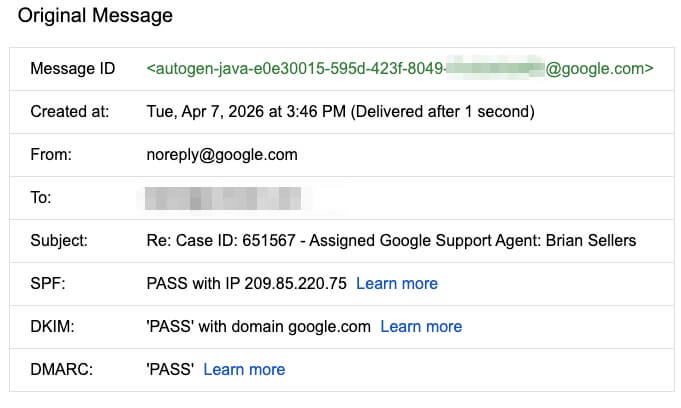
Now, it isn’t important if you know what those mean, but the important thing is that for somebody that does know how to look them up (such as myself), they prove that the emails were in fact sent directly from Google’s servers.
This confused me a little, since just because I knew Google actually sent the emails, it didn’t mean that I thought they were actually legitimate. (Once I had a little time after I had hung up, I did figure out how they were sending those emails, and I have sent that info to Google so that they can hopefully close that loophole.)
The point is, any reasonable person looking at those emails with those subject lines could easily be fooled into thinking they were real emails and that just adds to the sense of danger that somebody might be trying to steal your account and that you need to let the person on the phone help you protect it.
I don’t know exactly what their end game was going to be, because we shortly came to the point where he finally asked me for information he didn’t already have. As soon as I told him that I don’t give information over the phone on an unsolicited phone call, he hung up on me because he knew he wasn’t going to get any further and it was a waste of his time.
Pro Tip: If you aren’t expecting a phone call and the person asks for information from you, always say, “I do not give out information over the phone from an unsolicited call.”
Those magic words will stop many scams because they work on a numbers system, and wasting time on somebody that’s unlikely to give up information is time that they can’t spend stealing money from somebody else.
My assumption based on our interactions up to that point was the phone call was going to most likely go in the following direction:
- Did you try to change your number from {legitimate number} to {fake number}?
- Let me help you secure your account. I have just sent you an email at {legitimate email address}, do you see it? (This email comes from Google and introduces the “name” of the person you are on the phone with.)
- I just sent you another email with a link where you can sign in to secure your account. (This email includes a link to a “support” area on a Google domain; they were using a Google Sites website so it technically was on Google’s website.)
- ==> This is where I was hung up on, so the rest is conjecture…
- If I visited that link, I am guessing it would either redirect me to install malware, or might try to hijack my Google session cookies, or (most likely) would ask me to login to my “support” desk.
- Assuming the support desk option is what they went with, they’d then try to login to my account on their computer while displaying a screen telling me that they just sent me a 2-Factor Authentication request and to verify the number or approve the login, depending on what you have setup in your account.
- They now have access to your account, can change your password, and can log you out of all of your devices while they browse your files and emails to see what’s worth stealing, and if you have any bank accounts they can then access using your email as a way to verify their identity.
This was one of the smoothest social engineering attempts I’ve seen; even more than the time the “police” called and claimed that we had missed jury duty. (If anybody ever tells you that you need to go buy some gift cards to stay out of jail, they are 100% scamming you.) I could easily have seen myself falling for this when I was younger and hadn’t taught myself what to look out for from scammers, and if I hadn’t answered the phone expecting some sort of grift then I would have found everything that they said very convincing.
After getting off of the phone, I did immediately go in and update passwords. I already use two-factor authentication and passkeys everywhere, so I wasn’t too worried, but did check that they were in good shape and refreshed my one-time-use pass codes and invalidated all of my old ones.
I also checked what logged-in devices, phone numbers, and recovery accounts were associated with my accounts just to make sure there wasn’t anything suspicious or old and out of date that had gotten into my account. Everything was clean, though there was an old unverified phone number that I no longer use that I deleted. (It couldn’t have been used, but no sense in leaving old information that’s no longer relevant in there.)
Want to learn how to spot scammers targeting people like yourself?
Check out Part 2 of our Author Safety & Security series.
We cover the human side of staying safe and spotting dangers.
Unethical people will try to get access to your info. These days, if they can get into your email account (especially if they can lock you out), there’s a really good chance they can access a lot of your digital life before you have a chance to stop it.
Robodialers aren’t just used for call centers and telemarketers; they can be used to mass dial thousands of phone numbers per hour and allow a relatively small number of humans to connect with their targets. Phone numbers can be spoofed to appear to come from anywhere in the world or even to be legitimate numbers for actual businesses. Generated AI voices are already capable of bypassing the need for humans and can sound human and respond in near real time to a conversation.
So what should we do to protect ourselves?
For best practices, I recommend setting up your digital life with:
- A trustworthy password manager
- Unique and random passwords for every website
- 2-Factor Authentication or passkeys everywhere you can
- A healthy skepticism for anybody reaching out to you over phone or email that you aren’t expecting; always ask yourself, “Is this person legitimately who they say they are?”
- Don’t be afraid to tell somebody you are going to hang up and call back, after going directly to that company’s website, logging into your portal, and finding their actual phone number rather than relying on a fake number they may have sent you directly.
At the end of the day, these scammers are relying on your panic and your politeness to bypass your common sense. They want you to move quickly so you don’t have time to think.
By slowing down, asking the hard questions, and remembering that no legitimate service will ever demand your sensitive information over an unsolicited phone call, you can keep your digital life (and your hard-won author platform) completely secure.
Stay skeptical, keep your 2-factor authentication turned on, and when in doubt, always hang up and go straight to the source.
Want more information for how to keep yourself safe? Check out the previous trainings we have done on these topics before, which are available here:
- Training #571: Author Safety & Security (Part 1) – The technological side of staying safe
- Training #574: Author Safety & Security (Part 2) – The human aspect of staying safe